
Android Navigation Drawer

Hello programming world, today it looks like you are interested in trying to implement a navigational drawer within you application. Within this tutorial we are going to be focusing on drawer implementation with Kotlin but if you are interested in learning how in Java or Swift. NavigationDrawer or also known NavigationView which is a panel that shows you the menu but is hidden until the user swiping from the left or right or user touches the hamburger icon( )
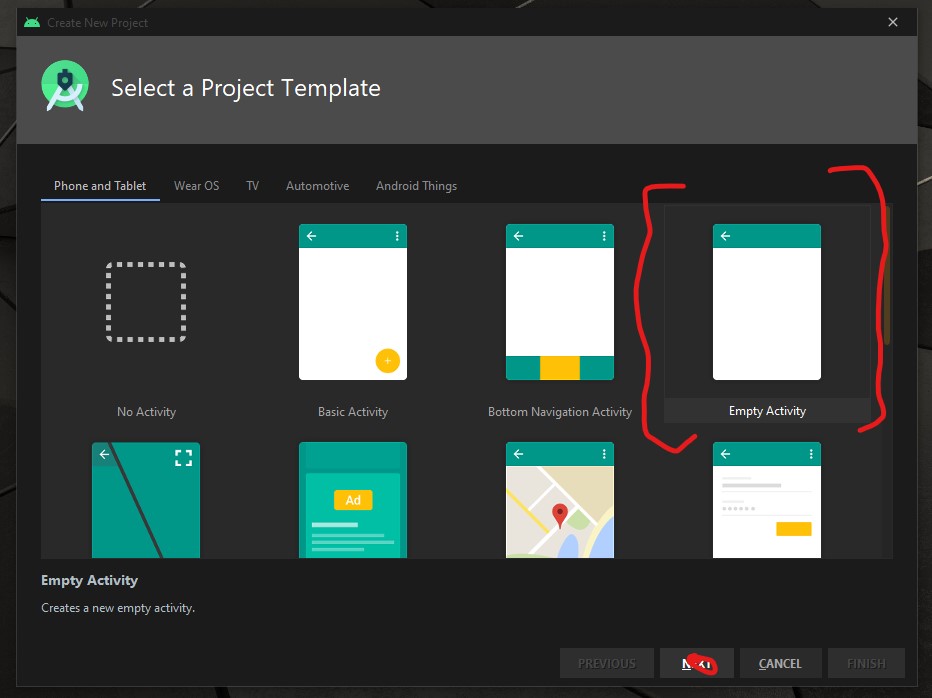
To begin the development open your Android IDE and select “Empty Actvity” then select the “NEXT” button.
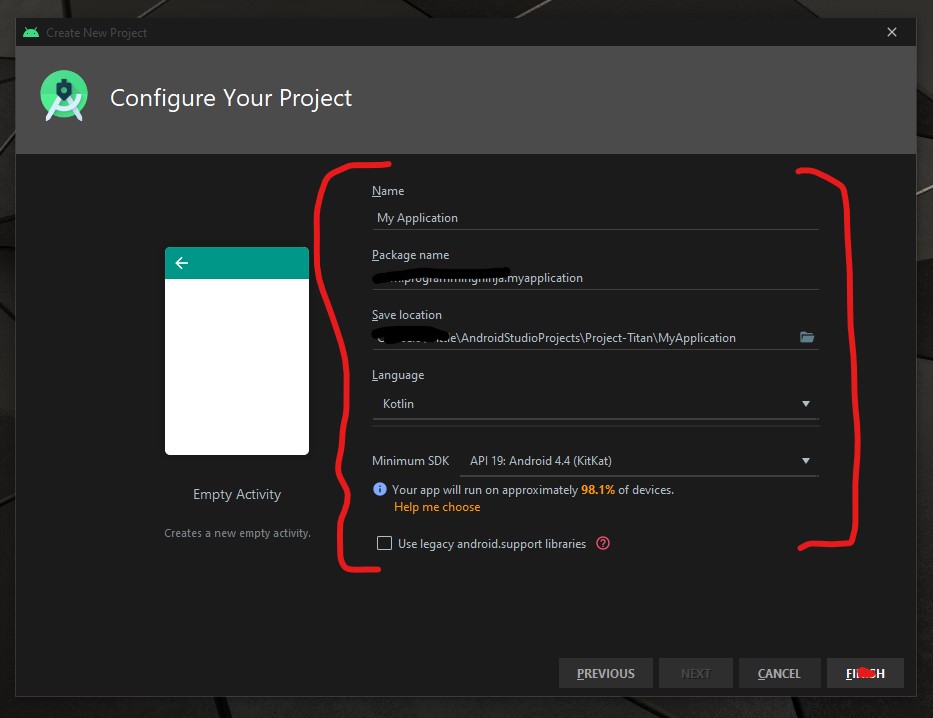
Now it is time to configure the project with changing the following fields Name and Language as seen in the image below.
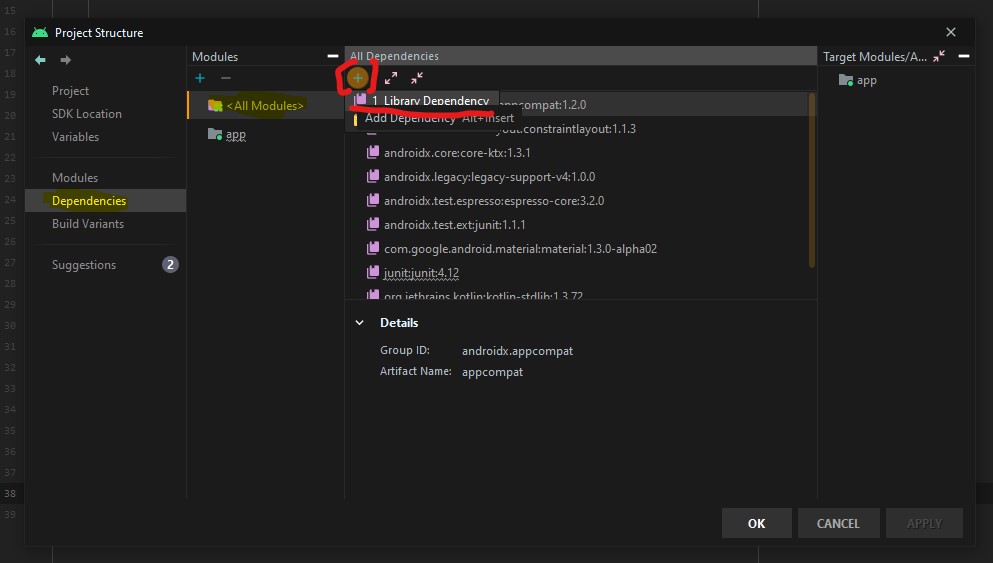
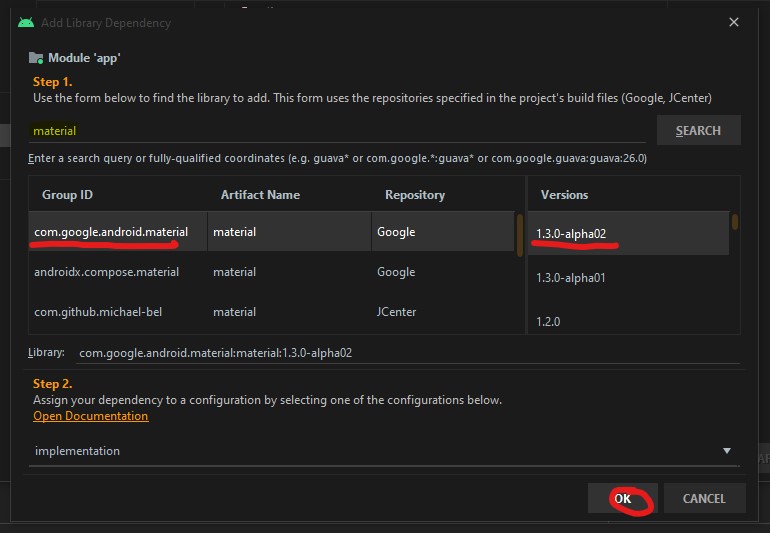
Now we need to add the material dependency into the project which has the NavigationView and then sync the project. You do have two options to accomplish this task.
the first way is adding to the build.gradle (Module: app)
implementation 'com.google.android.material:material:1.3.0-alpha02'
Or the second way is using the “Dependencies” selector. To achieve this select File -> Package Structure.. (Ctrl+Alt+Shift+S) ->
Now that the dependency is add we are going to focus on the main activity layout and this is where the navigation menu is going to be displayed.
<androidx.drawerlayout.widget.DrawerLayout
        xmlns:android="http://schemas.android.com/apk/res/android"
        xmlns:tools="http://schemas.android.com/tools"
        xmlns:app="http://schemas.android.com/apk/res-auto"
        android:layout_width="match_parent"
        android:layout_height="match_parent"
        android:id="@+id/drawer"
        tools:openDrawer="start"
        tools:context=".MainActivity">

    <RelativeLayout
            android:layout_width="wrap_content"
            android:layout_height="wrap_content">

        <androidx.appcompat.widget.Toolbar
                android:layout_width="match_parent"
                android:layout_height="wrap_content"
                android:id="@+id/tb_toolbar"
                app:title="Coeus Drawer Demo"
                app:titleTextColor="@color/cardview_light_background"
                android:background="@color/colorAccent" />

        <FrameLayout
                android:layout_width="match_parent"
                android:layout_height="match_parent"
                android:id="@+id/frame_container" />
    </RelativeLayout>

    <com.google.android.material.navigation.NavigationView
            android:layout_width="wrap_content"
            android:layout_height="match_parent"
            android:id="@+id/nv_menu"
            app:menu="@menu/ico_menu"
            app:headerLayout="@layout/nav_header"
            android:layout_gravity="start" />
</androidx.drawerlayout.widget.DrawerLayout>
Now that we have the DrawerLayout as the parent view and this draw the view for the child items
- Line 20
- Line 29
Within the NavigationView there are two attributes that we need there purpose as follow
- Line 33*: declare items which we need to show in the navigation view, the list of menu
- Line 34*: define the layout which is the header layout in the navigation view, the top part of the navigation view which is mostly used to describe user details or app details (Lets create the layout that is be referenced here, please see code beow)
***Note: when short to creating to new resource “ALT+SHIFT+ENTER”
<?xml version="1.0" encoding="utf-8"?>
<androidx.appcompat.widget.LinearLayoutCompat
    xmlns:android="http://schemas.android.com/apk/res/android"
    android:layout_width="match_parent"
    android:layout_height="wrap_content"
    android:orientation="vertical"
    android:background="@color/colorAccent">

    <androidx.appcompat.widget.AppCompatImageView
            android:layout_width="wrap_content"
            android:layout_height="wrap_content"
            android:id="@+id/img_user_image"
            android:src="@mipmap/ic_launcher_round"/>

    <androidx.appcompat.widget.AppCompatTextView
            android:layout_width="wrap_content"
            android:layout_height="wrap_content"
            android:id="@+id/tv_user_name"
            android:text="User Name"
            android:textSize="30dp"
            android:textColor="@color/cardview_light_background" />

    <androidx.appcompat.widget.AppCompatTextView
            android:layout_width="wrap_content"
            android:layout_height="wrap_content"
            android:id="@+id/tv_user_details"
            android:text="user details"
            android:textSize="20dp"
            android:textColor="@color/cardview_light_background" />
</androidx.appcompat.widget.LinearLayoutCompat>
No we need to modify ActionBar within the style.xml so we don’t run into a complication since we are using our own type of toolbar. We will be modifying the line 2 from DarkActionBar to NoActionBar
<!-- Base application theme. -->
    <style name="AppTheme" parent="Theme.AppCompat.Light.NoActionBar">
        <!-- Customize your theme here. -->
        <item name="colorPrimary">@color/colorPrimary</item>
        <item name="colorPrimaryDark">@color/colorPrimaryDark</item>
        <item name="colorAccent">@color/colorAccent</item>
    </style>
Now that we have completed the layout and now need to focus on the kotlin class (.kt). Select the MainActivity class and everything is going to take place within the OnCreate(), so we’ll begin by setting our new toolbar as the actionbar.
val tb = findViewById<Toolbar>(R.id.tb_toolbar)
setSupportActionBar(tb)
Now it is time to set the actionBar to fire the toggle state, the user wants to ‘open’ and ‘close’ the navigation view.
val nav: NavigationView? = findViewById(R.id.nv_menu)
val drawer: DrawerLayout? = findViewById(R.id.drawer)
val toggle: ActionBarDrawerToggle? = ActionBarDrawerToggle(this, drawer,tb, R.string.open, R.string.close) //create string arguements
Setup a handler to respond to click events on the navigation elements and swap out the fragment. This can be put into the activity directly:
***To understand what a fragment check out the fragment post:
supportFragmentManager.beginTransaction().replace(R.id.frame_container, HomeFragment()).commit()
nav?.setCheckedItem(m_home)
And set the specific action on menuItem clicks. Here, we are showing the toast message for anything that doesn’t have a fragment already create. Ideally, you this is where can start a new activity, or open fragment etc.
nav?.setNavigationItemSelectedListener(object : NavigationView.OnNavigationItemSelectedListener {
     var temp: Fragment? = null

     override fun onNavigationItemSelected(item: MenuItem): Boolean {
          when (item.itemId) {
              m_home -> temp = HomeFragment()
              m_calls -> Toast.makeText(applicationContext, "You have clicked the call", Toast.LENGTH_SHORT).show()
              m_settings -> Toast.makeText(applicationContext, "You have clicked the settings", Toast.LENGTH_SHORT).show()
          }
supportFragmentManager.beginTransaction().replace(R.id.frame_container, temp!!).commit()
drawer.closeDrawer(GravityCompat.START)
                return true
            }
        })
What is the user press back button, the application should check the navigationView and make sure the drawer is closed first and then the app. For this, we will override the onBackPressed() method.
override fun onBackPressed() {
        if (drawer.isDrawerOpen(GravityCompat.START)) {
            drawer.closeDrawer(GravityCompat.START)
        } else {
            super.onBackPressed()
        }
    }
Now check for any errors and if all is good then let’s run the app. If everything compiles correctly then it should be working fine. There is much more in NavigationView like icons in the menu items etc. Try to explore more and share us with on our twitter or slack channel.
- Published in Android, Kotlin, Programming Languages
Discovering C# with Console
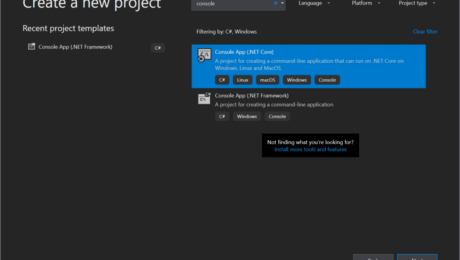
In this tutorial, we will learn how to write a simple “Hello World!” program in C#. This will get you familiar with the basic syntax and requirements of a C# program.
The “Hello World!” program is often the first program we see when we dive into a new language. It simply prints Hello World! on the output screen
he purpose of this program is to get us familiar with the basic syntax and requirements of a programming language.
“Hello World”
using System;
namespace HelloWorld
{
    class Hello {
        static void Main(string[] args)
        {
            //Hello comment block
            Console.WriteLine("Hello World!");
        }
    }
}
Note: This is the default setup when creating a new application within the request solution.
Now you may run the application, press F5 and the output should be: “Hello World!”
Understanding the “Hello World” program and how it works
- //Hello comment block
- // – represents the start of a comment section in C#. No worries comment sections/blocks are not executed by the C# compiler. (Consider when reading or using comments for better communicating with developers. To learn more about comments)
- namespace HelloWorld {…}
- is used to define the application namespace. So the example above namespace is called “HelloWorld”
- the perfect way to see namespace is like a container that will consist of methods, classes, and even other namespaces. (To learn more about namespace)
- class Hello {…}
- reflecting on the above example the class is created with the name – Hello in C#. C# is an object-oriented language and is mandatory for program execution.
- static void Main(string[], args){…}
- ‘Main()‘ this a method within the class of “Hello”. During the execution of a C# application, it will start with the ‘Main()‘
- Console.WriteLine(“Hello World”);
- to keep it short just remember in console application this will print the text to the user screen.
Tackling Hello World differently
// Hello World! program
namespace HelloWorld
{
    class Hello {
        static void Main(string[] args)
        {
            System.Console.WriteLine("Hello World!");
        }
    }
}
The above code is another way to execute the ‘Hello World’ program. Please take note with the two codes, the orignal code we began with and the code from above, the first difference is the missing “using System;”. Second difference to notice is the adding of the “System” before Console.WriteLine
Don’t worry more on this is another post.
Take away
- ‘Main()’ method must be inside the class definition
- Every C# program has to have a class definition
- Most importantly the execution begins within the ‘Main()’ method
So let’s keep it simple as a newbie this is an excellent introduction to C#. If anything within this post is hard to comprehend, don’t worry in the beginning I was the same way as well. As you progress with your read and research everything will begin to fall in place.
- Published in .NET & .NET Core, C#, Language, Programming Languages
Using forEach, forEnumerated, forIn within Swift

Swift provides us with multiple ways to loop through items in a collection, they are:
for pokemon in pokemons {
   print(pokemon)
}

pokemons.forEach { (pokemon) in
   print("Pokemon", pokemon)
}

for (index, element) in pokemons.enumerated() {
   print("Number:", index, "Pokemon:", element)
}
Using for in
many programming languages the for in loo is called for-each. Standard loop statement in other languages uses this format:
for (i = 0; i < n; i++) {
   ///some fancy collecion to loop thur
}
Please note: Swift 3 no longer supports c-style for-loops
Now when using swift this approach is a little different, the rationale of this for-in syntax is it can be used to loop over ranges, iterators, strings, sequences, and collections with the same syntax.
let pokemons = ["Pikachu", "Charmander", "Squirtle", "Bulbasaur"]

for i in 0...< pokemons.count {
   print("Pokemon \(i+1):" pokemons[i])
}

//output:
Pokemon 1: Pikachu
Pokemon 2: Charmander
Pokemon 3: Squirtle
Pokemon 4: Bulbasaur
Within Swift the use of object types like arrays, dictionaries, and sets are known as collection. Any collection can be iterated with a for-in loop. For example with dictionary:
let pokedex = ["Electric":"Pikachu","Water":"Squirtle","Fire":"Charmander","Grass":"Bulbasaur"]

for (type, pokemon) in pokedex {
   print("The \(type)'s Pokemon is \(pokemon))
}

//output
The Electric's Pokemon is Pikachu
The Water's Pokemon is Squirtle
The Fire's Pokemon is Charmander
The Grass's Pokemon is Bulbasaur
In addition, Swift also provided two range operators lowerBound...upperBound as a shortcut for expressing a range of values.
Take note: lowebound is greater than upperBound the code will crash
for i in 0...5 {
   print(i)
}
//output
0
1
2
3
4
5

for i in 0..<5 {
   print(i)
}

//output
0
1
2
3
4
If interested in reversing the range while looping, we can easily achieve that using reversed
for i in (0...5).reversed() {
   print(i)
}

//output
5
4
3
2
1
0
Stride
As I referenced before, C-Style for loops are no longer supported within Swift 3, so you’re probably asking how to acquire the ‘increment of the counter’ (i++). We accomplished this by using stride, and this helps us to move from one value to another using any incremental value, we can also specify whether the upperBound is inclusive or exclusive.
for i in stride(from 0, to: 10, by: 2) {
   print(i)
}

//output
0
2
4
6
8
Using for each
pokemons.forEach {
   print("Pokemon", pokemon)
}

//output
Pokemon Mewtwo
Pokemon Snorlax
Pokemon Eevee
Swift provides a dedicated method forEach for specific, unlike the above forIn this method can’t break the loop partway (at some point). It has to loop over each item in the sequence. It has to loop over each item in the sequence. This helps people reading your code to figure out your intent: that you want to act on all items, and won’t stop in the middle.
Please note:
breakstops execution in a loop immediately and continues directly after the loop.
continueonly exits the current iteration of the loop — it will jump back to the top of the loop and resumes up from there for next iteration
var oddNumbers = [Int]()

for numbers in (0...100) {
   guard oddNumbers.count < 15 else {
      break
   }

   guard numbers % 3 == 0 else {
      continue
   }

   oddNumbers.append(numbers)

   print(oddNumbers)
}
the same cannot be achieved in forEach with break and continue, so we need something like:
let oddNumbers = (0...100).filter {numbers -> Bool in
   return numbers % 3 == 0
}.prefix(10)

print(oddNumbers)
Using for enumerated
This Swift loop iterates to each of the items by also telling the index of it. In case if we need to iterate the elements and need their index also, then forEnumerated is the perfect loop for us.
Nested for loops:
var pokedex = ["001", "002", "003"]
var pokemons = ["Bulbasaur", "Ivysaur", "Venusaur"]

for i in 0..< pokedex.count {
   var string = "\(pokedex[i]) is "

   for _ in 1...3 {
      string += "\(pokemons[i])"
   }

   print(string)
}

//output
001 is Bulbasaur
002 is Ivysaur
003 is Venusaur
While:
// a while loop performs a set of statements until a condition becomes false
while condition {
   //statements
}

var index = 0
while index < pokemons.count {
   print(pokemon[index])
   index += 1
}

//output
Bulbasaur
Ivysaur
Venusaur
Repeat:
//repeat while loop is similar to do while loops in other languages

repeat {
   statements
} while condition

var index = 0
repeat {
   print (pokemons[index])
   index += 1
} while index < pokemons.count

//output
Bulbasaur
Ivysaur
Venusaur
It is similar to the above while loop but the major difference is that this loop evaluates the condition after running the statements. Either way, both while and repeat are best used in the loops where the numbers of steps are unknown.
- Published in blog, iOS, Programming Languages, Swift