
C# (pronounced as C sharp) is a general-purpose, object-oriented programming language. It is one of the most popular languages used for developing desktop and web applications.
Being a C based language, C# is closer to C++ and C. Syntactically, it is similar to Java.
Our C# programming tutorial will guide you to learn C# programming one step at a time.
Identifiers & Keywords
Identifiers C#
Identifiers are the name given to entities such as variables, methods, classes, etc. They are tokens in a program which uniquely identify an element. For example,
int value
From code above value is the variable which is why we call it the identifier. As you will find out later int is consider a “reserved” keyword so should not be used as an identifier unless the prefix @ is present.
Naming Conventions Rule Of Thumb
- Keywords should not be identifiers
- No whitespaces
- Case sensitivity : so
firstnameFirstnamefirstNameFirstNamethese are 4 different identifiers - Must begin with a letter, underscore or
@
Keywords C#
Keywords are predefined sets of reserved words that have special meaning in a program. The meaning of keywords can not be changed, neither can they be directly used as identifiers in a program. For example,
long phoneNumber
From the code above long is considered the keyword whilephoneNumber is the variable or the identifier. In C# long has a special meaning. Keywords such as long, int, bool, string etc are not allowed to be used as identifiers. However when there is a will then we have a way so even though keywords are “reserved” words, tha can be used as indentifiers if you add @ as the prefix long @int
Note: Though you can use the prefix
@I suggest as good practice and coding etiquette that you do not do that. It is what we call bad “juju”
- Published in .NET & .NET Core, C#, Programming Languages
Discovering C# with Console
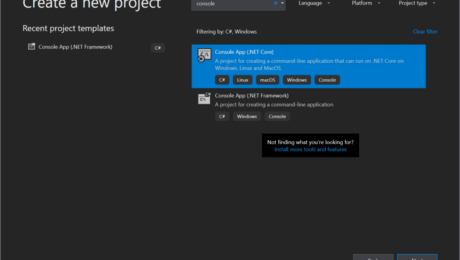
In this tutorial, we will learn how to write a simple “Hello World!” program in C#. This will get you familiar with the basic syntax and requirements of a C# program.
The “Hello World!” program is often the first program we see when we dive into a new language. It simply prints Hello World! on the output screen
he purpose of this program is to get us familiar with the basic syntax and requirements of a programming language.
“Hello World”
using System;
namespace HelloWorld
{
    class Hello {
        static void Main(string[] args)
        {
            //Hello comment block
            Console.WriteLine("Hello World!");
        }
    }
}
Note: This is the default setup when creating a new application within the request solution.
Now you may run the application, press F5 and the output should be: “Hello World!”
Understanding the “Hello World” program and how it works
- //Hello comment block
- // – represents the start of a comment section in C#. No worries comment sections/blocks are not executed by the C# compiler. (Consider when reading or using comments for better communicating with developers. To learn more about comments)
- namespace HelloWorld {…}
- is used to define the application namespace. So the example above namespace is called “HelloWorld”
- the perfect way to see namespace is like a container that will consist of methods, classes, and even other namespaces. (To learn more about namespace)
- class Hello {…}
- reflecting on the above example the class is created with the name – Hello in C#. C# is an object-oriented language and is mandatory for program execution.
- static void Main(string[], args){…}
- ‘Main()‘ this a method within the class of “Hello”. During the execution of a C# application, it will start with the ‘Main()‘
- Console.WriteLine(“Hello World”);
- to keep it short just remember in console application this will print the text to the user screen.
Tackling Hello World differently
// Hello World! program
namespace HelloWorld
{
    class Hello {
        static void Main(string[] args)
        {
            System.Console.WriteLine("Hello World!");
        }
    }
}
The above code is another way to execute the ‘Hello World’ program. Please take note with the two codes, the orignal code we began with and the code from above, the first difference is the missing “using System;”. Second difference to notice is the adding of the “System” before Console.WriteLine
Don’t worry more on this is another post.
Take away
- ‘Main()’ method must be inside the class definition
- Every C# program has to have a class definition
- Most importantly the execution begins within the ‘Main()’ method
So let’s keep it simple as a newbie this is an excellent introduction to C#. If anything within this post is hard to comprehend, don’t worry in the beginning I was the same way as well. As you progress with your read and research everything will begin to fall in place.
- Published in .NET & .NET Core, C#, Language, Programming Languages
Did Someone Say Reflection C#
Maybe you are new to the .Net lifestyle or maybe you are a veteran, either way, you ended up here to get a better understanding of what reflection is all about. To begin reflection is the process of describing various metadata of types, methods, and fields in code, that is literal Microsoft definition but no worries I will explain it. So before we dive into anything else you should already have an understanding of namespaces are and why we use them.
With reflection in C#, you can dynamically create an instance of a type and bing that type to an existing object. Moreover, you can get the type from an existing object and access its properties. When you use attributes in your code, reflection gives you access as it provides objects of the type that describe modules, assemblies, and types.
So in this article, I’ll discuss C# Reflection with various examples. Here we’ll learn the way of getting type information using different ways and use of properties and methods of C# Reflection type class.
Here’s a simple example of reflection using the static method GetType – inherited by all types from the Object base class – to obtain the type of a variable,
//using GetType to obtain type information
int a = 42;
System.Type type = a.GetType();
System.Console.WriteLine(type);
//the output will display as the following
//System.Int32
Defining Reflection in C#
To understand reflection, there are a few basics you should understand about modules, types, and members:
- Assemblies contain modules
- Modules contain types
- Types contain members
You need to use Reflection when you want to inspect the contents of an assembly. For example, you can get all members of the object by typing “.” before an object when viewing your Visual Studio editor IntelliSense.
A program reflects on itself when it extracts metadata from its assemblies, then uses it to modify its behavior or inform the user. When you write a C# program that uses reflection, you can use either the TypeOf operator or the GetType() method to get the object’s type.
Examples of Reflection in C#
Implementing reflection in C# requires a two-step process. You first get the “type” object, then use the type to browse members such as “methods” and “properties”. This is how you would create instances of DateTime class from the system assembly:
//create instance of class DateTime
DateTime dt = (DateTime) Activator.CreateInstance(typeof(DateTime);
Namespace Test
{
   public class YuGiOh
   {
      public YuGiOh() {...}
      public string name
      public static double Attack {get{...} set{...}}
      public static double Defense {get{...} set{...}}
      public static string Attribute() {...}
      public static string MonsterEffect() {...}
      public static int Stars () {get{...} set{...}}
      public static string CardType() {...}
   }
}

//dynamically load assembly file
Assembly yugioh = Assembly.LoadFile(@"c:'Test.dll")

//get type of class YuGiOh from just loaded assembly
Type card = yugioh.GetType("Test.YuGiOh");

//create instance of class YuGiOh
object cardInstance = Activator.CreateInstance(card);
And access its members (the following examples illustrate getting values for the public double Number property):
//get info about property: public double Attack
PropertyInfo cardPropertyInfo = card.GetProperty("Attack");

//get the value of property: public double Attack
double value = (double)cardPropertyInfo.GetValue(cardInstance, null);

//set value of property: public double Attack
cardPropertyInfo.SetValue(cardInstance, 10.0, null);
Then, you
Understanding How Reflection Works
The main class for reflection is the System.Type class, which is an abstract class representing a type in the Common Type System. When you use this class, you can find the types used in a module and namespace and also determine if a given type is a reference or value type. You can parse the corresponding metadata tables to look through these items:
- Fields
- properties
- Methods
- Events
Understanding How Reflection in C# Works
There are several uses including:
- Use Module to get all global and non-global methods defined in the module.
- Use MethodInfo to look at information such as parameters, name, return type, access modifiers, and implementation details.
- Use EventInfo to find out the event-handler data type, the name, declaring type and custom attributes.
- Use ConstructorInfo to get data on the parameters, access modifiers, and implementation details of a constructor.
- Use Assembly to load modules listed in the assembly manifest.
- Use PropertyInfo to get the declaring type, reflected type, data type, name and writable status of a property or to get and set property values.
- Use CustomAttributeData to find out information on custom attributes or to review attributes without having to create more instances.
Other uses for Reflection include constructing symbol tables, to determine which fields to persist and through serialization.
- Published in .NET & .NET Core, blog, C#, Programming Languages