
Dauris Little
all
  • About
  • Dauris’s Portfolio
  • Blogging Lyf
  • Contact
© 2016 Dauris Little. All rights reserved.
  • Home
  • Blog
  • Programming Languages
  • Android
  • Android w/ Fragments
November 12, 2025

BLOG & Gossip

Avatar photo
Dauris
Sunday, 03 May 2020 / Published in Android, Java, Kotlin, Programming Languages

Android w/ Fragments

A fragment is an Android component that holds part of the behavior and/or UI of an activity. As the name would suggest, fragments are not independent entities, but are tied to a single activity. In many ways, they have functionality similar to activities.

In the same way that you don’t actually need an army of little helpers to do your bidding, you don’t have to use fragments. However, if you use them well, they can provide:

  • Modularity – Diving complex activity code across fragments for better maintenance
  • Adaptability – representing sections of a UI within the different fragments while utilizing different layouts that relys on the screen orientation and size
  • Reusability – placing behavior or UI parts within the fragments that multiple activities can share

Fragment Lifecycle of Android

As you already know like activity, a fragment has a lifecycle with events that occur when the status changes within the framents. For example, when an event fires becasue a fragment becomes visible and active, or is not used or removed. Just as in a regular activity you are able to add code and behavior to the callbacks for the events.

Below you will see the fragment lifescycle diagram:
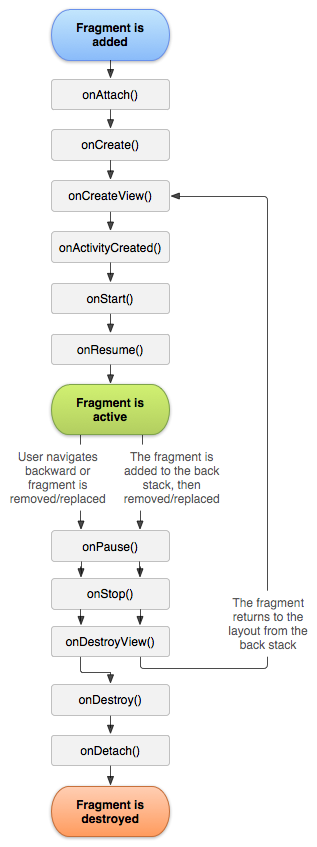
Diagram designed by Android Developer documentation

Understanding the lifecycle

  • onAttach : the fragment attaches to its host activity
  • onCreate : When a new fragment initializes, which always happens after it attaches to the hosts.
  • onCreateView : creates its portion of the view hierarchy, which then added to the activity’s hierarchy of view
  • onActivityCreated : fragment’s activity has finished on its own onCreate
  • onStart : fragment becomes visible and starts after its activity starts 
  • onResume : fragment is visible and interactable that resumes only after its activity resumes and often resumes immediately after the activity does.
  • onPause : user may not interact
  • onStop : this is fired when the fragment is no longer visible; the fragment will get change with another fragment or it gets removed from actvity or fragment’s is stopped
  • onDestroyView : this is fired when the view and other resources created within the onCreateView() are removed from the activity’s view hierarchy and destroyed.
  • onDestroy : fired when the fragment does the final clean up.
  • onDetach : fires when the fragment is detached from the activity host

If you want to learn more details regarding please read “Droid Fragments Life”.This is all about how the fragment come up within the activity and goes out. Cool!!  

  • Tweet
Tagged under: android, android development, fragment, fragments, java, kotlin

What you can read next

val vs var
Val vs Var
Android Rating: In-App Review API
Android, SQLite & Kotlin

Leave a Reply Cancel reply

Your email address will not be published. Required fields are marked *

This site uses Akismet to reduce spam. Learn how your comment data is processed.

Categories

Recent Posts

  • Gesture Controls for Android w/Kotlin

    Incorporating Gesture controls in your android ...
  • Android Rating: In-App Review API

    An app rating and reviews are crucial if you wa...
  • QR Reader in Android w/ Kotlin

    Turn your phone's camera into a QR scanner...
  • Creating Advance Custom Snackbar w/ Kotlin

    Ask 100 different developers about what they fi...
  • Swift Has Tuple

    Swift provides us with a type called Tuple whic...

Recent Comments

  • Homepage on Integrating Google’s reCAPTCHA w/Android
  • Cleora Weideman on Integrating Google’s reCAPTCHA w/Android
  • alpha femme keto Reviews on Integrating Google’s reCAPTCHA w/Android
  • best skin care products reviews on Integrating Google’s reCAPTCHA w/Android
  • Robyn on Integrating Google’s reCAPTCHA w/Android

Archives

  • January 2022
  • December 2021
  • September 2021
  • June 2021
  • May 2021
  • April 2021
  • March 2021
  • February 2021
  • January 2021
  • December 2020
  • October 2020
  • August 2020
  • July 2020
  • May 2020
  • March 2020
  • February 2020
  • December 2019
  • October 2019
  • September 2019
  • May 2019
  • March 2019
  • February 2019
  • January 2019
  • August 2018
  • April 2018
  • August 2017
  • November 2016
  • August 2016

Categories

  • .NET & .NET Core
  • Active Directory
  • Android
  • API
  • bitcoin
  • blog
  • C#
  • Development
  • E-Commerce
  • HTML5
  • iOS
  • Java
  • Javascript
  • Kotlin
  • Language
  • Like I Am Five
  • Mobile Development
  • New Web Site
  • Programming Languages
  • Swift
  • Tutorial
  • Uncategorized
  • Web Application Development
  • Windows AD

Meta

  • Log in
  • Entries feed
  • Comments feed
  • WordPress.org

© 2015. All rights reserved. Buy Kallyas Theme.

TOP
This site uses tracking cookies to personalize content and ads. AcceptLearn More