
The ($) and (_) within JavaScript

The dollar sign ($) and the underscore (_) characters are JavaScript (js) identifiers, which just means that they identify an object in the same way a name would. The objects they identify include things such as variables, functions, properties, events, and objects.
For this reason, these characters are not treated the same way as other special symbols. Instead, JavaScript treats $ and _ as if they were letters of the alphabet.
A js identifier — again, just a name for any object — must start with a lower or upper case letter, underscore (_), or dollar sign ($); subsequent characters can also include digits (0-9). Anywhere that an alphabetic character is allowed in js, 54 possible letters are available: any lowercase letter (a through z), any uppercase letter (A through Z), $ and _.
What is the ($) Identifier
The dollar sign is commonly used as a shortcut to the function document.getElementById(). Because this function is fairly verbose and used frequently in js, the $ has long been used as its alias, and many of the libraries available for use with JavaScript create a $() function that references an element from the DOM if you pass it the id of that element.
There is nothing about $ that requires it to be used this way, however. But it has been the convention, although there is nothing in the language to enforce it.
The dollar sign $ was chosen for the function name by the first of these libraries because it is a short one-character word, and $ was least likely to be used by itself as a function name and therefore the least likely to clash with other code in the page.
Now multiple libraries are providing their own version of the $() function, so many now provide the option to turn off that definition in order to avoid clashes.
Of course, you don’t need to use a library to be able to use $(). All you need to substitute $() for document.getElementById() is to add a definition of the $() function to your code as follows:
function $(x) {return document.getElementById(x);}
What about (_) Identifier
A convention has also developed regarding the use of _, which is frequently used to preface the name of an object’s property or method that is private. This is a quick and easy way to immediately identify a private class member, and it is so widely used, that almost every programmer will recognize it.
This is particularly useful in JavaScript since defining fields as private or public is done without the use of the private and public keywords (at least this is true in the versions of JavaScript used in web browsers — js 2.0 does allow these keywords).
Note that again, as with $, the use of _ is merely a convention and is not enforced by JavaScript itself. As far as js is concerned, $ and _ are just ordinary letters of the alphabet.
Of course, this special treatment of $ and _ applies only within JavaScript itself. When you test for alphabetic characters in the data, they are treated as special characters no different from any of the other special characters.
- Published in blog, Javascript
The Wonders of Getters & Setters in JS

Okay with the assumption that you are a ” something that reference newbie” and be aware I am probably two years in the game and just now understanding this behind javascript.
So as you may already know ‘Getters’ and ‘Setters’ are common archetypal methods in several other programming languages, specifically more within object-oriented languages like C#, Java, and Objective- C. Solet go ahead and dig right into it.
In most object-oriented languages, ‘Getters’ and ‘Setters’ refer to the properties of a given object. Getters are methods that return the value of that property, and as you may assume setters set them. Now Javascript has many object-oriented features, and this taps into some of those.
The reason they’re a thing and why they exist is a lot more clear in other languages in my personal opinion. So I will go on a tangent briefly so you can understand what I mean and the language of my choice will be Java. Okay, so let’s assume that you want to make some cars. To do that, in java we need a class called “Cars”
class Car {
   private int year;
   private string make;
   private string model;
   private string vin;
   private string color;
}
To make a car, we’d do this
//create a new car that will be called infiniti
Car infiniti = new Car();
A result, since Infiniti is a car and we said that Cars have a year and a make, we know Infiniti has these.
Don’t worry I will each the code snippet stated above, take note of the word private? That means that only Infiniti knows its year and its make and most importantly, it’s own vin. What this means is that Java, the following would not run and would fail:
CarJacker someRandomThief = new CarJacker();
someRandomThief.attemptingToGetVin(infiniti.vin);
In JS, you can do that –access the property directly through the dot operator. Now, why on the earth would you want that in a language? Because it makes things easier to maintain, it makes code safer and of course cleaner in the long run. When those properties are private, you can prevent other parts of a program you’re writing from accidentally changing them and weird bugs from showing up. this protecting of properties from outside objects is called encapsulation and is hugely important in OOP. Some would consider this a great feature but it can also be super annoying, because how often do we have variables that we never want any other part of the program to access?
Finally entering into the fray are ‘Getters’ and ‘Setters’. Commonly in Java and other languages as stated before getters and setters methods which allow “outsiders” to access those properties.
class Car {
   private int year;
   private string make;
   private string model;
   private string vin;
   private string color;

   public string getVinNumber() {
      //this method returns the vin number of the car
      return vin;
   }

   public void setVinNumber(string newVinCreated) {
       //'this' refers to the object itself --Infiniti, etc
       this.vin = newVinCreated;
   }
}
As a result, outside objects can now interact! So if our car thief got lucky, it could instead:
CarJacker someRandomThief = new CarJacker();
//now we just stole a new car
someRandomThief.attemptingToGetVin(infiniti.getVinNumber());
Now in Java, and the other languages that I know of, ‘getter’ and ‘setter’ are common but not formal: ie, I could call getVinNumber() something as unrelated as UnlessMethodName() and it would still work–but would just be a note helpful name.
I know this was much longer than some of my other posts but it all has a purpose of course. Now within the js you have “get” and “set” doing those things because of the OOP idea of encapsulation and getters and setters, which is a useful idea–and sort of a hard sell in particular in js, where it’s not enforced because you don’t have to declare whether something is private, so it becomes a sort of arbitrary weird layer unless you understand the original intended purpose.
Ultimately the pattern behind is a thing I dislike about JavaScript — and I’ll be as honest as I can be, I’ve read that documentation so many times before, and even again as I was preparing this post and without much it still makes very little sense to me, and I’ve had a lot more experience since the first time I read it along with a hunk of object-oriented under my belt… and it still is really hard to follow.
In short, get latest() is a means of having things happen when you want the value of latest, and enables that to happen–since you have to have a function or method for things to happen–while still letting you skip the “()” because it’s single value representing a property.
- JS has a prototypical inheritance, not class-based. Which is far from the only difference, but a huge one.
- As with everything, there are differences of opinion and you can still have crazy OOP code, it’s not perfect but that’s the intended purpose.
- I strongly feel that stuff like Raccoon raccoon = new Raccoon() leads too quickly to semantic satiation and can lead to more bugs and always go for more specific or least different variable names when I can, but anyways.
- Published in blog, Javascript, Like I Am Five
UMD & ESM… What the heck is this?

In the beginning, JS did not have a way to import/export modules. This was a problem for many developers and if you don’t believe then picture this. You’re writing an app in just a single file, I know I know it would be a nightmare.
So as time progress, people of higher intellect than myself attempted to add modularity to javascript. The ones that shouldn’t surprise you is UMD and ESM but there are others of course like CommonJS, Native JS and AMD. There are several others but the two from above are considered some of the big players
I am going to tackle some brief information like syntax, purpose and common behaviors. My goal is to help others that may be confused when dealing with particular issues with modules.
UMD
Universal Module Definition or as referenced UMD.
– Works on front and back end (hence the name universal).
– Unlike the other modules, UMD is more like a pattern to configure several module systems. Check out other patterns
– UMD is usually used as a fallback module when using bundler like rollup/Webpack
(function (root, factory) {
if (typeof define === "function" && define.amd) {
define(["jquery", "underscore"], factory);
} else if (typeof exports == "object") {
module.exports = factory(require("jquery"), require("underscore"));
} else {
root.Requester = factory(root.$, root._);}}(this, function ($,_) {	//this is where I defined my module implementation	var Requester = {//...};
return Requester;}));
ESM
ES Module short as ESM. It is javascript’s proposal to implement as standard module system. I am sure many of you have seen this: import React from 'react'
- Works in many modern browsers
- Tree-shakeable, due to ES6’s static module structure
- ESM allows bundlers like rollup to remove unnecessary code, allowing sites to ship less code to get faster load
- can be called in HTML
<script type="module"> import {func1} from 'my-lib';
func1(); </script>
Summary
– ESM is the best module format thanks to its simple syntax, async nature, and tree-shakeability.
– UMD works everywhere and usually used as a fallback in case ESM does not work
Thanks for reading, devs! In the future, I plan to write in depth about each module, especially ESM because it is packed with many awesomeness.
- Published in blog, Javascript
Machine Learning w/ eCommerce

We hear a lot about Machine Learning these days as it has become one of the hottest buzzwords around. However, we are approached by many people who don’t seem to have a clear idea on how it could be applied to add value to their business. Since it is a very broad topic with different types of applications based on the desired goals and objectives, we aim to create a series of blog posts, each targeting a different industry, and just touch on some of the different ways in which Machine Learning can help add value to a business within that particular industry. Today, we’ll start with eCommerce, as it is one of the low hanging fruits that can quickly be picked for enhancement via Machine Learning.
What kind of Machine Learning is applicable in eCommerce?
Machine Learning comes in several different forms such as Supervised Learning, Unsupervised Learning, Semi-Supervised Learning and Reinforced Learning. The scope of this blog won’t delve into the technical details, but we’ll just preface our eCommerce based solutions discussion with the information that while Machine Learning can be used to do things like drive cars, perform facial recognition, or identify a car’s license plate from CCTV footage, what we aim to do in our eCommerce implementation is to be able to identify user behavior patterns to perform predictive analysis and make proactive decisions driven by data. We’ll explain in further detail.
Recommendation Engine
Perhaps one of the biggest reasons why Amazon was able to demolish all its opponents in the eCommerce industry is/was largely due to their incredible recommendation engine which is entirely based on Machine Learning. A recommendation engine takes in past user behavior analytics information as training data and learns the different patterns and trends. After ingesting millions upon millions of records of these purchasing habits of users, along with their profiles (Supervised Learning), the system will be able to predict how a new user may end up browsing the website, or what products they may be interested in, based on their browsing habits, the items in the cart, and what people with a similar profile have done in the past. When the user completes their transaction, the recommendation will take into account if its recommendations were successful or not, and further improve its algorithm (Reinforced Learning).
A Recommendation Engine is similar to the rack you find during checkout at the grocery store (usually contains candy, gum, magazines, etc.). It is an opportunity to remind the shopper of an item that they may want/need but had forgotten about, or to entice them to buy something they weren’t even planning on buying in the first place. The more accurate these recommendations are to the shopper’s wants & needs, the more likely they are to purchase additional items.
Price Optimization
Another area in which Machine Learning is providing a great deal of assistance to the business team is in Price Optimization. Prices for products can fluctuate a great deal depending on dozens—if not hundreds—of variables. A pricing engine can be created to take into account a great deal of information from the shopper’s profile, current trends, competitor prices, product abandonment rates, and much more, and determine what percentage discount to offer the shopper on a specific product in order to increase the potential of making the sale, while keeping a healthy profit margin on the product. When dealing with a catalog of hundreds of millions of products & variants, with hundreds of factors going into pricing each one of them, you can see how quickly it can become infeasible for humans to do this task with full coverage. By utilizing Machine Learning to optimize pricing on a catalog of products, eCommerce stores can unlock a massive competitive advantage.
Retargeting, Discounts & Upsells
A shopper may not always complete the purchase. They may browse for a while, even add items to their cart, and eventually leave without completing the transaction. Machine Learning can help add value here as well. Retargeting campaigns can be executed to reach out to previous customers who have bought, abandoned a cart, or just browsed your website. These campaigns can be supercharged with Machine Learning by looking at historic data of similar shopper profiles and how they may have been converted in the past via retargeting. In some cases, Facebook or Instagram ads may have worked. In other cases, offering a discount valid for 24 hours on the products in their abandoned cart may have worked. It all depends on what the data is telling you, and that is where Machine Learning shines. As it is already analyzing hundreds of millions of past shoppers’ habits and outcomes, it will be able to predict what is most likely to work when attempting to convert a potential customer with similar habits & profile details.
Conclusion
These are just a few tips and tricks that are being used by eCommerce giants such as Amazon and Walmart, and more stores are jumping onboard with this line of thinking (for obvious reasons). With the availability of tools such as Google’s AutoML, and similar offerings from Amazon, Microsoft and others, Machine Learning is no longer the scary black box it once was and there has never been a better time to climb onboard the Machine Learning train as it leaves the station. If you are interested in implementing Machine Learning to add value to your business, reach out to us and we’d be happy to discuss the different options that may be available to you.
- Published in blog, E-Commerce
Single Page VS. Multi-Page Application

Single Page App (SPA)
A single-page application and will refer to as (SPA) is an app that works inside a browser and does not require page reloading during use. You are using this type of applications every day. These are, for instance: Gmail, Google Maps, Facebook or GitHub.
SPAs are all about serving an outstanding UX by trying to imitate a “natural” environment in the browser — no page reloads, no extra wait time. It is just one web page that you visit which then loads all other content using JavaScript — which they heavily depend on.
Multiple Page App (MPA)
Multiple-page applications and will refer to as (MPA) work in a “traditional” way. Every change eg. display the data or submit data back to server requests rendering a new page from the server in the browser. These applications are large, bigger than SPAs because they need to be. Due to the amount of content, these applications have many levels of UI. Luckily, it’s not a problem anymore. Thanks to AJAX, we don’t have to worry that big and complex applications have to transfer a lot of data between server and browser. That solution improves and it allows to refresh only particular parts of the application. On the other hand, it adds more complexity and it is more difficult to develop than a single-page application.
Before Development
You need to consider the goal of the site and who you are targeting overall. If you know you need multiple categories (because, for instance, you run an online shop or publish a lot of other content) — use a multi-page site. If you are sure that your site is appropriate for a pure single-page experience — go for it. And if you like SPA but can just barely fit everything into a single page, consider the hybrid site instead. This is another way I haven’t mentioned before. A hybrid application takes what is the best in both approaches and try to minimize the disadvantages. It is, in fact, a single page application which uses URL anchors as synthetic pages enabling more in build browser navigation and preference functionality. But this is the topic for another article.
Possibly in the near future, everyone will use Single Page Application model (including a hybrid app), as it seems to bring a lot of advantages. Many apps on the market are migrating towards this model. However, as some projects simply cannot fit into SPA, the MPA model is still vivid.
- Published in Development, New Web Site, Web Application Development
What is Bitcoin? The Nitty and Gritty Guide
So the new topic that is raving all over within the news and around the water cooler is Bitcoins. Everyone wants to know what it is, how to use it and is it even worth it?
So to start the definition that investor should be familiar is :
Bitcoin is a crytocurrency, a form of electronic cash.
It is a decentralized digital currency without a central bank or single adminstrator that can be sent from user to user on peer-to-peer bitcoin blockchanin network without the need for intermediaries.
I will explain how the system works, how you can use it for your profit, which scams to avoid. I will also direct you to resources that will help you store and use your first pieces of digital currency.
Small wonder that Bitcoin emerged in 2008 just after Occupy Wall Street accused big banks of misusing borrowers’ money, duping clients, rigging the system, and charging boggling fees. Bitcoin pioneers wanted to put the seller in charge, eliminate the middleman, cancel interest fees, and make transactions transparent, to hack corruption and cut fees. They created a decentralized system, where you could control your funds and know what was going on.
Bitcoin has come far in a relatively short time. All over the world, companies, from REEDS Jewelers, a large jewelry chain in the US, to a private hospital in Warsaw, Poland, accept its currency. Billion dollar businesses such as Dell, Expedia, PayPal, and Microsoft do, too. Websites promote it, publications such as Bitcoin Magazine publish its news, forums discuss cryptocurrency and trade its coins. It has its application programming interface (API), price index, and exchange rate.
Problems include thieves hacking accounts, high volatility, and transaction delays. On the other hand, people in third world countries may find Bitcoin their most reliable channel yet for giving or receiving money.
Key Highlights
- October 31, 2008: Bitcoin whitepaper published.
- January 3, 2009: The Genesis Block is mined.
- January 12, 2009: The first Bitcoin transaction.
- December 16, 2009: Version 0.2 is released.
- November 6, 2010: Market cap exceeds $1 million USD.
- October 2011: Bitcoin forks for the first time to create Litecoin.
- June 3, 2012: Block 181919 created with 1322 transactions. It is the largest block to-date.
- June 2012: Coinbase launches.
- September 27, 2012: Bitcoin Foundation is formed.
- February 7, 2014: Mt. Gox hack.
- June 2015: BitLicense gets established. This is one of the most significant cryptocurrency regulations.
- August 1, 2017: Bitcoin forks again to form Bitcoin Cash.
- August 23, 2017: SegWit gets activated.
- September 2017: China bans BTC trading.
- December 2017: First bitcoin futures contracts were launched by CBOE Global Markets (CBOE) and the Chicago Mercantile Exchange (CME).
- September 2018: Cryptocurrencies collapsed 80% from their peak in January 2018, making the 2018 cryptocurrency crash worse than the Dot-com bubble’s 78% collapse.
- November 15, 2018: Bitcoin’s market cap fell below $100 billion for the first time since October 2017.
- October 31, 2018: 10-year anniversary of Bitcoin.
Understanding Bitcoin – What is Bitcoin in-depth?
At its simplest, Bitcoin is either virtual currency or reference to the technology. You can make transactions by check, wiring, or cash. You can also use Bitcoin (or BTC), where you refer the purchaser to your signature, which is a long line of security code encrypted with 16 distinct symbols. The purchaser decodes the code with his smartphone to get your cryptocurrency. Put another way; cryptocurrency is an exchange of digital information that allows you to buy or sell goods and services.The transaction gains its security and trust by running on a peer-to-peer computer network that is similar to Skype, or BitTorrent, a file-sharing system.
Bitcoin Transactional properties:
1.) Irreversible: After confirmation, a transaction can‘t be reversed. By nobody. And nobody means nobody. Not you, not your bank, not the president of the United States, not Satoshi, not your miner. Nobody. If you send money, you send it. Period. No one can help you, if you sent your funds to a scammer or if a hacker stole them from your computer. There is no safety net.
2.) Pseudonymous: Neither transactions or accounts are connected to real-world identities. You receive Bitcoins on so-called addresses, which are randomly seeming chains of around 30 characters. While it is usually possible to analyze the transaction flow, it is not necessarily possible to connect the real world identity of users with those addresses.
3.) Fast and global: Transaction is propagated nearly instantly in the network and are confirmed in a couple of minutes. Since they happen in a global network of computers they are completely indifferent of your physical location. It doesn‘t matter if I send Bitcoin to my neighbor or to someone on the other side of the world.
4.) Secure: Bitcoin funds are locked in a public key cryptography system. Only the owner of the private key can send cryptocurrency. Strong cryptography and the magic of big numbers makes it impossible to break this scheme. A Bitcoin address is more secure than Fort Knox.
5.) Permissionless: You don‘t have to ask anybody to use cryptocurrency. It‘s just a software that everybody can download for free. After you installed it, you can receive and send Bitcoins or other cryptocurrencies. No one can prevent you. There is no gatekeeper.
Where can I find Bitcoins?
First, we would recommend you read this in-depth guide for buying Bitcoin.
You can get your first bitcoins from any of these four places.
- A cryptocurrency exchange where you can exchange ‘regular’ coins for bitcoins, or for satoshis, which are like the BTC-type of cents. Resources: Coinbase and Coinsquare in the US & Canada, and BitBargain UK and Bittylicious in the UK.
- A Bitcoin ATM (or cryptocurrency exchange) where you can change bitcoins or cash for another cryptocurrency. Resources: Your best bets are BTER and CoinCorner
- A classified service where you can find a seller who will help you trade bitcoins for cash. Resources: The definitive site is LocalBitcoins.
- You could sell a product or service for bitcoins. Resources: Sites like Purse.
Caution! Bitcoin is notorious for scams, so before using any service look for reviews from previous customers or post your questions on the Bitcoin forum.
How To Buy Bitcoin Anywhere?

If you want to buy cryptocurrency quick and easily with your credit card check out the CoinBase!
There are a lot of options on how to buy Bitcoin, available in nearly every country of the world from, Gift cards, ATM, local Traders, broker, exchanges: A better guide that will explains, how to buy Bitcoin anywhere in the world.
Maybe you heard about this crazy cryptocurrency Bitcoin. The future of money, the revolution of payment, the digital gold, slayer of capital controls, holy grail of Fintech. Now you maybe want to know more. The best way to learn is just to try it. Buy a Bitcoin, pay with it, store it in your digital wallet, watch the price rise or go down. But where can you buy it? And how?
For many people, the first acquisition of a Bitcoin is a terrifying process. It seems so complicated. But actually, it is not. There are a lot of options to easily, fast and comfortably buy your first Bitcoin.
Which one is the best depends on your country and your preferences?
If you are in a hurry, you can just click on the link in the table to find out your options on how to buy Bitcoin.
TLDR:
- Use Regular Fiat Money to Buy Bitcoin.
- Once you have a Bitcoin wallet, you use a traditional payment method such as a credit card, bank transfer (ACH), debit card, interact or E-transfer to buy Bitcoins on a Bitcoin exchange.
- The Bitcoins are then transferred to your crypto wallet.
To find the perfect method to buy your first Bitcoin however you should first take into account several factors:
- How much private information do you want to disclose?
- How do you want to pay?
- Where do you live
Depending on these factors you should easily be able to decide which platform fits your needs.
I will explain the options you have to disclose private information (or not disclose it) and include what payment channels you can use. After this, you will find the common methods that is most popular to buy Bitcoin.
How To Buy Bitcoin Anywhere in The World
Private Information
Bitcoin is a financial tool and thus subject to financial regulation in most jurisdictions. Nearly everywhere Anti-Money-Laundering-Rules (AML) are applied to platforms that sell Bitcoins or enable users to buy and sell Bitcoins. Most of these platforms have to adopt Know Your Customer rules (KYC) to verify the identity of its users.
Since Bitcoin transactions are saved publicly visible on the blockchain and can be traced back, the degree of private information you disclose with buying Bitcoins can have serious implications on your privacy.
There are several grades of KYC with an increasing amount of private information you have to disclose. The following list starts with the lowest grade:
- No KYC: No KYC means that the platform or the seller of Bitcoins does not know who you are. You don‘t have to show an identity document, and you pay with a private means of payment like cash, Moneygram, Paysafecard or Western-Union. Buying Bitcoin without KYC is possible in some jurisdictions – for example with P2P-marketplaces like LocalBitcoins, ATMs or Gift Cards – but is usually more expensive than other options.
- KYC Light: This degree of KYC identifies you by your payment channel and/or your phone numbers. If you pay with your bank account, PayPal, credit card or other common means of payment, the payment providers know your identity. On most platforms, be it direct exchanges, exchange platforms or marketplaces, you can buy a limited amount of Bitcoins with KYC Light.
- Full KYC: On top of verifying your identity with your phone number and your bank account, Full KYC means that you provide documents that prove your identity. This can be a passport, an ID card, a driver‘s license, a utility bill or a combination of all of this. Some platforms demand that you provide an approval of your identity documents by a notary or a trusted third party like your bank; some are satisfied if you submit a photo showing you holding your ID card or take part in the process of video identification. If you want to invest larger amounts of money or trade on exchanges, there‘s usually no way around Full KYC.
Payment
Bitcoin is money, but to buy Bitcoins, you need to send money to someone else. The more advanced the financial system of your country is, The better the financial system you live in, the easier it is to exchange your money in Bitcoins.
Here is an incomplete not-complete list of commons means of payment to buy Bitcoin:
- Bank transfer: Everybody might know the good old Bank transfer. Mostly with online banking you send money to a seller of Bitcoins and get the Bitcoins when the payments are done. In most countries, this needs 1-3 days. Direct debiting is usually not accepted common. Most exchange platforms only accept bank transfers.
- Credit Card: Credit cards are one of the most common means of payment. But only a few direct commercial vendors accept credit cards. The reason is that Bitcoin transactions cannot be undone, while credit card transactions can be reversed. This has resulted in losses for vendors which accepted credit cards. Also, vendors risk that people buy Bitcoin with stolen credit cards.Use Bitcoins to profit from stolen credit card numbers and apply algorithms to reduce the risk.
- PayPal: A few platforms accept PayPal, but most reject it for the same problems as credit cards: PayPal transactions can be easily undone, and when this is done after the buyer has transferred the acquired Bitcoin to another wallet, the vendor might lose. This is why eBay is a bad place to trade Bitcoins. But, like with credit cards, some platforms accept PayPal.
- Other Payment Channels (Sofort, iDeal, Skrill…): The world of payment is rich with payment providers. In the EU alone you have dozens of them. Many direct exchanges support a rich collection of them. If you use a common provider, in Germany Sofort, in the Netherlands iDeal and so on, you have a good chance that your domestic direct exchange accepts it.
- Private Payment Channels (Cash, Western Union, Paysafecard, etc.): Most commercial platforms don‘t accept these means of payment. You find very few exchange platform and most probably no direct exchange where these payments are accepted. But often you‘ll find a seller on p2p marketplaces you can pay with cash or other private means of payments. A good chance might also be an ATM where you can buy Bitcoins with cash.
Different Ways To Buy Bitcoin
Now we‘re coming closer to the acquisition of your Bitcoin. In this part of our guide, we present you several common models that enable you to change fiat-money to digital cash – in Bitcoin. Each model has its own advantages and disadvantages.
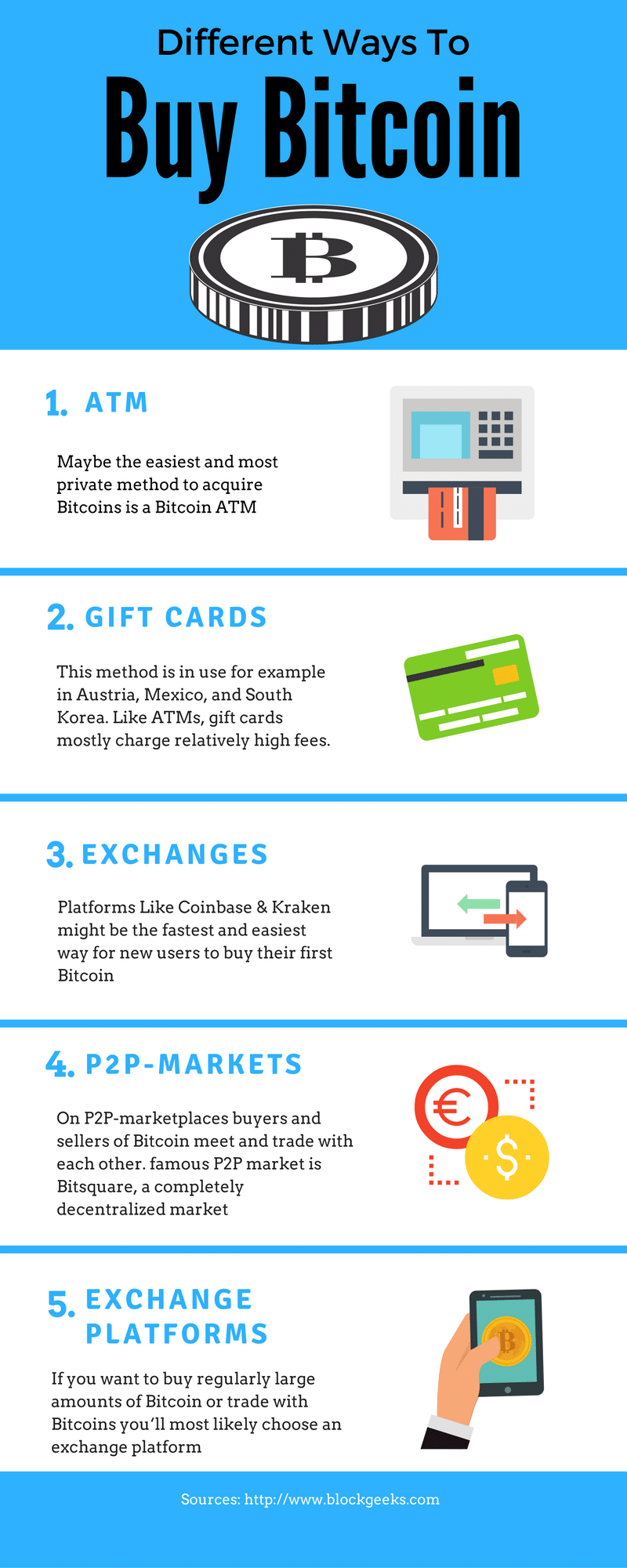
- ATM: Maybe the easiest and most private method to acquire Bitcoins is a Bitcoin ATM. You know it, these machines where you can get money with your card. Some companies like Lamassu produce ATM-machines for Bitcoins, where you can buy Bitcoin with cash. If the operators of these machines wish, they can apply some KYC-rules, from mobile phone verification to biometric methods. On Coin-ATM-Radar.com you find a global map with these machines. Another kind of ATM is to just use an existing net of ATMs, like that from banks or train stations, to sell Bitcoins. This has been done for example in the Swiss, in the Ukraine or in Spain. ATMs mostly have a relatively high fee of 3-6 percent or even more.
- Gift Cards/Voucher: This is another easy method to buy Bitcoins. You go to a kiosk or some other shop, buy a gift card or a voucher, visit a website, where you can use the code on the card to get your Bitcoin. This method is in use for example in Austria, Mexico, and South Korea. Like ATMs, gift cards mostly charge relatively high fees.
- Direct commercial exchanges/brokers: These vendors are like the exchange offices you might know from an airport, but digital. They buy Bitcoins on an exchange and sell it to customers. You visit a website, choose your means of payment, pay and get Bitcoins for prices set by the platform. For most of these platforms, you need your own wallet, while some, for example, Coinbase and Circle, give you the option to save and spend the Bitcoins with a wallet they provide. Since you can use a great variety of payment channels, even credit cards, and PayPal, such platforms might be the fastest and easiest way for new users to buy their first Bitcoin. The fees of direct commercial exchanges vary between 1 and 5 percent. Some of them earn money by using the spread between buy and sell. Most demand extra fees for some means of payment like credit cards.
- P2P-Markets: On P2P-marketplaces buyers and sellers of Bitcoin meet and trade with each other. The fees on these markets are relatively low with 0 to 1 percent; the spread depends on the liquidity of the market and the payment channel. Other than with direct you can not only take, but make an offer: You set a price and wait until someone sells you a Bitcoin. This enables you to buy relatively large amounts of Bitcoin at relatively low prices. The most famous P2P-market is LocalBitcoins. This worldwide platform serves a lot of currencies and lets buyers and sellers decide which means of payment they use. It is often used to facilitate anonymous exchanges, sometimes for extraordinarily high prices. Bitcoin.de, the largest P2P-market in the Eurozone offers a good liquidity and is a nice option to easily change Euro to Bitcoin. The third famous P2P market is bitsquare, a completely decentralized market, which is nothing more than a software that connects people.
- Exchange platforms: If you want to buy regularly large amounts of Bitcoin to good prices or trade with Bitcoins you‘ll most likely choose an exchange platform. Exchanges act as an escrow for its clients and save both Bitcoin and Fiat-money on behalf of their customers. Here you can offer your own orders to buy or sell Bitcoin, and the Their trading engine of the exchanges cumulates these orders and s offers from buyers and sellers and processes trades. Often exchanges have more options to trade like margin trading. Usually, fees and the spread are low. But the process to start an account on exchanges can be complicated, requires privacy disclosing information and needs you to trust the exchange with your money.
Warnings about exchanges, wallets and banks
Despite the proof of identity requirements, remember exchanges and wallets don’t provide the same protections banks do.
For example, there is often no or limited insurance for your account if the exchange goes out of business or is robbed by hackers, such as was the case with the infamous failed exchange Mt Gox.
Bitcoin does not have legal status as a currency in most of the world, and authorities usually do not know how best to approach thefts. Some larger exchanges have replaced customer funds after a theft from the exchange itself, but at this stage, they are not legally obliged to do so.
How to buy Bitcoin in your country?
Worldwide: Understand nearly everywhere in the world, you have a chance to use local bitcoins, BitSquare or a Bitcoin ATM. While these are options you could use, it is worth to look for further options available in your country. Below I am only going to reference the buying of bitcoin only with the USA
USA
The USA is one of the biggest markets for Bitcoin buyers. Buyers can choose from a wide variety of options to buy Bitcoins that you will, you find beside LocalBitcoins and ATMs the direct vendors Coinbase, Circle, and India coin, the P2P-market Paxful and the exchange Kraken.
Buy Bitcoin In USA
- Direct Exchanges: With Coinbase and Kraken two major platforms offer an easy way to buy Bitcoins with low fees and save them in an online-wallet. Both platforms accept both bank transfers and credit cards. Indacoin is another platform for the direct exchange, but without an integrated wallet. A next option, Expresscoin, enables the acquisition of Bitcoins with cash via Billpay.
- P2P-Markets: Beside LocalBitcoins and Bitsquare Bitquick and Paxful are P2P-markets available for customers in the US. On Bitquick you pay by depositing leaving cash on the bank of the seller, on Paxful the seller can choose whatever payment-channel he wants, including PayPal, Western Union, credit and debit cards, gift cards and much more. While prices on Paxful are usually quite high, Bitquick charges a fee of 2 percent.
- Exchanges: If you want to buy Bitcoins with Dollar on an exchange, you have a couple of platforms to choose. The biggest exchanges are Bitstamp; Coinbase‘s GDAX and Bitfinex, followed by BTC-E, Kraken, and Gemini. While most exchanges strictly accept bank transfers, BTC-E offers additionally the funding of an account with Credit Cards and payment providers like PerfectMoney, Paysafecards and more.
Now for the Conclusion
Buying bitcoins is not always as easy as newcomers expect. The good news is the number of options is increasing, and it is getting easier all the time.
Snapchat’s Developer API Creates Lots of Opportunities

Snapchat’s CEO Evan Spiegel has announced the company’s next big step, which is the release of the much anticipated developer APIs. Snapchat will finally allow 3rd party web & mobile application developers to leverage Snapchat’s platform with deep integrations. This has been eagerly awaited by the development community as Snapchat was one of the last holdouts from the major social media networks to release an API. They cited “Privacy & Security” as the main factors behind the delay in taking this step, and given the recent climate, this was probably smart. In this post, I’ll dive into a bit more detail on not only the privacy aspects, but first let’s have a look at the feature-set and discuss some of the possibilities these new APIs bring to the table.
1. Login
There will of course be a login API called Snap Login, which doesn’t surprise anyone, given that a similar feature exists for Facebook, Twitter, Google, and a ton of other platforms. However, the difference here is that Snap will not give the developers any information beyond just the username. Developers will not be able to gather any demographics or profile information on the user, and Snapchat has explicitly said that they will never open up the user’s friends list to the developers for privacy reasons. Smart move.
2. Camera
Next up is the Snap Camera API which will enable users to be able to share content directly to their Snapchat Story from other apps. This has been a highly requested feature for some time now and it is great to see Snap take the feedback received from the app developers community to heart. Sharing experiences on Facebook & Twitter had been a breeze till now, and Snapchat was definitely starting to get left behind, so this was much needed. Imagine a scenario where you are at a birthday party, and have been taking pictures & video clips all evening. The next day, you can simply open up your Photos app, select pictures & videos from that event and create a new Story.
3. Bitmoji
Another API that is being made available will allow users to use their Bitmoji avatar in other apps, such as Messages or Tinder. Personally, I don’t get what all the fuss is about with Bitmojis and ever really understood that whole hype. But I guess it’s something the kids are doing and it was a simple enough integration for Snap to make. People apparently invest a lot of time & effort into their Bitmojis and see it as an extension of themselves. Posting reaction memes and gifs in message threads has become commonplace, so this seems to be a feature stemming from the same vein.
4. Embedding
Lastly, and perhaps the biggest API in my opinion, is one that will allow developers use public Snap (photos & videos) to create themed Stories on the web. This is where the big picture starts to become a bit clearer. Nowadays it is almost a given that an article, whether news or entertainment related, will have a tweet or two embedded within it to quote prominent people involved in the story. What Snapchat is trying to do here is recreate that lightning in a bottle, with pictures & videos. Although Instagram does already have embedding available for Insta Posts, they don’t have such a feature for Stories. Being able to create your *own* story is similar to Moments by Twitter, where you can collect a bunch of (publicly available) tweets and organize them into a Moment which can be viewed in the Twitter app, or as an embedded frame on a web site. With Snap’s new API, people will now be able to do the same, but with publicly available Snaps. This feature has the potential to capture a completely different audience than the one Snap is currently catering too, which is just what the company needs amidst growing concerns of stagnating user growth.
Data Privacy & Security
Snap has made it very clear that at the heart of this big new step will be Data Privacy & Security. All 3rd party apps will go through an approval & review process. Apple was the first company to introduce a review process for 3rd party apps to go live on its platform. Back in the day, Facebook & Android were allowing 3rd party developers to build and deploy apps without any intervention from the platform itself, while Apple was making developers go through painfully long approval processes (they used to sometimes take up to 3 weeks).
Over time however, Apple was vindicated in their decision to put security first, as the App Store quickly gained the reputation of being a secure environment for all people, regardless of technical knowledge, to safely download apps without fear. Meanwhile, Facebook was filled to the brim with spam in the form of game invites, and letting developers scrape & dump vast amounts of private user data. Android had its own share of issues with malware and spyware running rampant in their apps as their platform was as open as they get. Eventually, both Facebook & Android introduced approval processes, which have since become the norm. Snap, learning from its predecessors, has followed suit.
Conclusion
It had become apparent that Snap was losing the battle to Instagram, and that bold moves would be required in order to stay relevant in the next 5 years. While this may not be the blockbuster move that captures all the headlines, it is definitely steps in the right direction. Snap needs to be able to prove to its investors that it can grow beyond the youth demographic that it currently touts as its crowning jewel, and continue to grow. Time will tell if this will be the moment that Snap turns it around. They sure do need a win right about now.
- Published in API, Mobile Development
Different Type of Websites

The web is vast. As of now, there are billions of websites online, all competing for some share of the attention people give to their online browsing each day. When you’re starting a new website, it can be overwhelming to think about all the other websites out there.
But it’s helpful to remember that within that huge number of websites, you have a lot of different categories of types of websites trying to accomplish different things. As you consider how best to build your own website, carefully consider what type of website you want it to be. When you can narrow down the goals and setup you have in mind, you can more easily identify the other websites in your category to look to for inspiration.
Here are twelve of the most popular types of websites you’ll see around the web. While there’s some overlap between the different categories, in general each type of website has certain goals to achieve and its own set of best practices. Which one will your website be?
1. eCommerce Website
An e-commerce website is a website people can directly buy products from. You’ve probably used a number of e-commerce websites before, most big brands and plenty of smaller ones have one. Any website that includes a shopping cart and a way for you to provide credit card information to make a purchase falls into this category.
If you’re setting up a website for your business and plan to sell your products through the site, then this is the type of website you need to build. There are some specific steps you have to be sure to include when building an eCommerce website, like investing in eCommerce software and getting your SSL certificate to ensure your customers can pay securely. And you’ll want to make sure your web design and copy are all crafted with the site’s main goal in mind: making sales. eCommerce websites can be an extension of a business you already have, or become something you build a new business around.
2. Business Website
A business website is any website that’s devoted to representing a specific business. It should be branded like the business (the same logo and positioning) and communicate the types of products and/or services the business offers.
By now, every business out there should have a website. It’s a widespread expectation. Every potential customer you encounter will just assume that if they Google your business looking for more information, they’ll find a website. And if they don’t, it makes the business look less professional or legitimate.
E-commerce websites are business websites, but it’s also possible to have business websites that don’t sell anything directly, but rather encourage visitors to get in contact for more information (a lead generation website) or come to a storefront if they’re interested in becoming customers.
3. Entertainment Website
If you think about your internet browsing habits, you can probably think of a few websites that you visit purely for entertainment purposes. They could be humor websites like The Onion, webcomics like xkcd, or just websites with fun or interesting content like Buzzfeed.
Most of these websites do aim to make money like business and e-commerce websites do, but usually through the advertisements that show up on the page rather than through selling specific products or services.
If you want to start an entertainment website, you’ve got a lot of options for formats that can take. You could make funny or informative videos, write entertaining blog posts, draw comics, or create fun quizzes.
4. Portfolio Website
Portfolio websites are sites devoted to showing examples of past work. Service providers who want to show potential clients the quality of the work they provide can use a portfolio website to collect some of the best samples of past work they’ve done. This type of website is simpler to build than a business website and more focused on a particular task: collecting work samples.
This type of website is most common for creative professionals and freelancers that are hired based on demonstrated skill and can be a more efficient alternative to a business website that serves a similar focus.
5. Media Website
Media websites collect news stories or other reporting. There’s some overlap here with entertainment websites, but media websites are more likely to include reported pieces in addition to or instead of content meant purely for entertainment. This category includes sites like the Washington Post website, Slate, and Inc.
Media websites generally make money through either advertisements that show up on the site, subscription models, or some combination of the two.
Many media websites are the online branch of media properties that often exist in other forms, like TV channels or print magazines and newspapers, but some are online only.
6. Brochure Website
Brochure websites are a simplified form of business websites. For businesses that know they need an online presence, but don’t want to invest a lot into it (maybe you’re confident you’ll continue to get most of your business from other sources), a simple brochure site that includes just a few pages that lay out the basics of what you do and provide contact information may be enough for you.
Brochure sites were more common in the earlier days of the internet when businesses knew they needed a website, but also expected not to be dependent on it for success. Now that the internet is such a big part of how people research and find just about every product and service they need, most businesses recognize that they need something more competitive.
7. Nonprofit Website
In the same way that businesses need websites to be their online presence, nonprofits do as well. A nonprofit website is the easiest way for many potential donors to make donations and will be the first place many people look to learn more about a nonprofit and determine if they want to support it.
If you have or are considering starting a nonprofit, then building a website for your organization is a crucial step in proving your legitimacy and reaching more people. You can use it to promote the projects your organization tackles, encourage followers to take action, and for accepting donations.
Note: To take donations through the website, you’ll have to take some of the same steps that the owners of eCommerce sites do. In particular, make sure you get an SSL certificate to make sure all payments are secure, and set up a merchant account so that you can accept credit card payments.
8. Educational Website
The websites of educational institutions and those offering online courses fall into the category of educational websites. These websites have the primary goal of either providing educational materials to visitors, or providing information on an educational institution to them.
Some educational websites will have advertisements like entertainment and media websites do. Some offer subscription models or educational products for purchase. And some serve as the online presence for an existing institution.
9. Infopreneur Website
Infopreneur websites overlap a bit with business and eCommerce websites, but they represent a unique type of online business. Infopreneurs create and sell information products.
Whatever form it takes, infopreneurs need their website to do the hard work of building up a knowledge brand – convincing visitors that they know enough to make their educational products worth buying – and the work of selling those products.
To sell information products securely, they’ll need some of the same tools of an eCommerce website, including an SSL certificate and a merchant account. Those with a lot of knowledge products should also invest in eCommerce software to make it easier for visitors to select and purchase the ones they’re interested in.
10. Personal Website
Not all websites exist to make money in some way or another. Many people find value in creating personal websites to put their own thoughts out into the world. This category includes personal blogs, vlogs, and photo diaries people share with the world.
Sometimes these websites can evolve into something that makes money if they become popular enough and the person who started them wants to make that shift, but they primarily exist as a way to share your feelings, insights, and art with any friends and strangers that might be interested.
11. Web Portal
Web portals are often websites designed for internal purposes at a business, organization, or institution. They collect information in different formats from different sources into one place to make all relevant information accessible to the people who need to see it. They often involve a login and personalized views for different users that ensure the information that’s accessible is most useful to their particular needs.
12. Wiki or Community Forum Website
Most people are familiar with wikis through the most famous example of one out there: Wikipedia. But wikis can be created on pretty much any subject you can imagine. A wiki is any website where various users are able to collaborate on content and all make their own tweaks and changes as they see fit. There are wikis for fan communities, for business resources, and for collecting valuable information sources.
What Type of Website Will You Create?
Whatever type of website you choose to create, it’s important to think through what you want from it and make sure you design it based on the particular goals you have in mind. And one of the first things you’ll need to figure out before your website goes live is where to host it.
- Published in blog, Development, New Web Site
Building eCommerce Sites and Things To Keep In Mind
Nowadays, you can buy pretty much anything you want with a few mouse clicks or swipes of a touchscreen. From handcrafted goods to household staples, there is not much that you can’t purchase online and have conveniently shipped to your front door.
If you know how start an online store the right way, you’ll be able to boost your profits significantly and grow your business year after year.
Why is it important to understand how to start an online store if commerce is your game? Where should we start?
We are living in the midst of a digital age. In today’s world, consumers are no longer bound by one particular geographical location.
On the contrary, nowadays people have the power to connect with their peers, conduct research, consume content, and most importantly shop wherever they are in the world with a few swipes of a screen. And that means that in the current climate, if you’re an entrepreneur looking to grow your business, building an online store might be the best thing you ever do.
At present, 21.8% of the planet’s population shops online, and in 2021, this number is expected to rise to more than 2 billion online shoppers.
The current state of eCommerce
Before we delve deeper into how to start an online store, let’s explore these eCommerce stats, facts and figures that prove the power of online shopping:
- On average, men spend $220 per online transaction and women spend $151 per transaction. That’s a high-value average spend per customer.
- Online shopping is more popular than ever before and by 2021, eCommerce sales are expected to climb to 17.5% of retail sales across the globe. That’s plenty of profit up for grabs.
- During Q3 2018, smartphones made up 61% of retail site visits globally. If you’re online store is mobile-optimized, you’re likely to boost your conversion rate, big-time.
- The main reason people shop online is that they’re able to buy items or products 24/7, literally.
Realizing the full power of an eCommerce website
Just to reiterate (and we do so because absorbing this message will give you the best possible chance of easy eCommerce success): eCommerce stores give businesses the power to act big, but remain small.
Through professional and powerful, yet affordable, online storefronts, businesses can reach an extremely large market and sell to a vast and wide customer base.
Estimations of U.S. online sales for 2019 are projected to soar to over $560 billion — and that number is only expected to grow. The same projections put eCommerce sales at roughly $414 billion to more than $735 billion by 2023. Mind-blowing.
As mentioned, online stores give small businesses the opportunity to tap into a massive marketplace and an entire nation of shoppers.
Easy eCommerce: How to start an online store in 3 steps
It’s clear that if you’re a modern business, entering the eCommerce arena is a wise move. To help you start your digital journey, here’s our how-to guide to create an online store, broken down into three simple steps:
- Fine-tune your idea.
- Create your online store.
- Promote your online store.
1. Fine-tune your idea
At this point, it’s likely that you know what you want to sell. Start fine-tuning your idea by deciding on a business name, conducting market research, and finding your audience.
Consider these questions: What makes your brand stand out from others in your niche? What particular pain points do you solve?
Work out the answers to these questions and you’ll be able to move forward in the best possible direction.
Choosing your business name and domain name
When it comes to naming your eCommerce business, choosing a name that is digestible, memorable, relevant, good for digital marketing purposes and will work well as a domain name is a must.
Your domain name is the web address for your digital storefront. You want it to truly represent who you are and what you have to offer — at a glance.
There are myriad domain extensions (the part of the domain name to the right of the dot, like .com) available to help you secure the perfect name. Consider a domain extension that suits your industry or niche and that will help you stand out from the crowd. Think .shop or .store for general eCommerce, or get more specific with .jewelry, .clothing, .coffee and more.
2. Create your online store
Once you’ve considered all of the key ingredients of a successful web-based eCommerce business, it’s time to start thinking about making it happen, in a practical sense.
The simplest and fastest way to get your online shop up and running is by using a templated eCommerce store.
With this option, you get it all in one quick install. An eCommerce website package includes an online shop website template (aka website theme), product pages, shopping cart, payment processing feature and hosting for the site.
Instead of building your store piece by piece, you can install the whole store at once.
GoDaddy Online Store or HostGator Online Store both of these sites includes all of these essentials plus award-winning customer support, tools for integrating with online marketplaces, Facebook and Google Analytics, and more.
Consider these questions: What makes your brand stand out from others in your niche? What particular pain points do you solve?
3. Promote your online store
The third and final element of our how to start an online store guide comes in the form of promotion or marketing.
Once you’ve fine-tuned your idea and actually created your online store, it’s time to shout about it to your target audience.
Here we’re going to explain how to promote an online store, expand your reach, and enjoy the profit-boosting success you no doubt deserve.
There are a host of avenues you can take when marketing your online store to prospective buyers, from connecting your website to popular third-party vendors to social media, email marketing and more.
But, before we delve into these all-important areas, it’s important to reiterate the importance of spreading the word about your online store.
Why you need to promote your online store
Many small business owners think that once they have created an online store their job is done.
In fact, that’s where the fun begins. Not everyone who creates an online store is successful in making it their primary source of income. But those who are successful have a few common characteristics:
They love their customers
Ask any successful online seller what they like about their business and they will have a ton of heart-warming customer stories on the tips of their tongues. They live for making their customers’ lives better.
They are scrappy and savvy marketers
The most successful online sellers have figured out a way to spread the word in their customer community. Some do it through social media marketing. Others identify influencers in their community and have them promote their product. Some business owners come up with clever viral marketing campaigns by promoting their products with special discounts.
Conclusion and next steps
eCommerce is not an industry; eCommerce is a tactic. – Tobias Lutke
An eCommerce website can open a large, new frontier for your business. You will be able to sell to millions around the world instead of the thousands in your neighborhood. You will be able to tap into a billion dollar market. And, you will be able to give your business an opportunity to expand and grow with minimal risk and low investment costs.
Once you’ve fine-tuned your idea with a great name and thorough market testing, an easy eCommerce website is just a few steps away.
Begin with a few products that you showcase on your eCommerce site with stellar photos and product descriptions. Prompt store visitors to take action with compelling CTAS and authentic customer testimonials and reviews. Make it easy for customers to pay via various methods. Offer multiple shipping options — including free shipping.
These are the basics that will get your online store up and running.
Then you can focus on expanding your product line and growing your business through digital marketing techniques such as email marketing, social media and online business listings.
Now that you know how to create an online store, get going and make those dreams a reality.
- Published in blog, Development, E-Commerce, New Web Site, Web Application Development