
Using forEach, forEnumerated, forIn within Swift
Swift provides us with multiple ways to loop through items in a collection, they are:
for pokemon in pokemons {
   print(pokemon)
}

pokemons.forEach { (pokemon) in
   print("Pokemon", pokemon)
}

for (index, element) in pokemons.enumerated() {
   print("Number:", index, "Pokemon:", element)
}
Using for in
many programming languages the for in loo is called for-each. Standard loop statement in other languages uses this format:
for (i = 0; i < n; i++) {
   ///some fancy collecion to loop thur
}
Please note: Swift 3 no longer supports c-style for-loops
Now when using swift this approach is a little different, the rationale of this for-in syntax is it can be used to loop over ranges, iterators, strings, sequences, and collections with the same syntax.
let pokemons = ["Pikachu", "Charmander", "Squirtle", "Bulbasaur"]

for i in 0...< pokemons.count {
   print("Pokemon \(i+1):" pokemons[i])
}

//output:
Pokemon 1: Pikachu
Pokemon 2: Charmander
Pokemon 3: Squirtle
Pokemon 4: Bulbasaur
Within Swift the use of object types like arrays, dictionaries, and sets are known as collection. Any collection can be iterated with a for-in loop. For example with dictionary:
let pokedex = ["Electric":"Pikachu","Water":"Squirtle","Fire":"Charmander","Grass":"Bulbasaur"]

for (type, pokemon) in pokedex {
   print("The \(type)'s Pokemon is \(pokemon))
}

//output
The Electric's Pokemon is Pikachu
The Water's Pokemon is Squirtle
The Fire's Pokemon is Charmander
The Grass's Pokemon is Bulbasaur
In addition, Swift also provided two range operators lowerBound...upperBound as a shortcut for expressing a range of values.
Take note: lowebound is greater than upperBound the code will crash
for i in 0...5 {
   print(i)
}
//output
0
1
2
3
4
5

for i in 0..<5 {
   print(i)
}

//output
0
1
2
3
4
If interested in reversing the range while looping, we can easily achieve that using reversed
for i in (0...5).reversed() {
   print(i)
}

//output
5
4
3
2
1
0
Stride
As I referenced before, C-Style for loops are no longer supported within Swift 3, so you’re probably asking how to acquire the ‘increment of the counter’ (i++). We accomplished this by using stride, and this helps us to move from one value to another using any incremental value, we can also specify whether the upperBound is inclusive or exclusive.
for i in stride(from 0, to: 10, by: 2) {
   print(i)
}

//output
0
2
4
6
8
Using for each
pokemons.forEach {
   print("Pokemon", pokemon)
}

//output
Pokemon Mewtwo
Pokemon Snorlax
Pokemon Eevee
Swift provides a dedicated method forEach for specific, unlike the above forIn this method can’t break the loop partway (at some point). It has to loop over each item in the sequence. It has to loop over each item in the sequence. This helps people reading your code to figure out your intent: that you want to act on all items, and won’t stop in the middle.
Please note:
breakstops execution in a loop immediately and continues directly after the loop.
continueonly exits the current iteration of the loop — it will jump back to the top of the loop and resumes up from there for next iteration
var oddNumbers = [Int]()

for numbers in (0...100) {
   guard oddNumbers.count < 15 else {
      break
   }

   guard numbers % 3 == 0 else {
      continue
   }

   oddNumbers.append(numbers)

   print(oddNumbers)
}
the same cannot be achieved in forEach with break and continue, so we need something like:
let oddNumbers = (0...100).filter {numbers -> Bool in
   return numbers % 3 == 0
}.prefix(10)

print(oddNumbers)
Using for enumerated
This Swift loop iterates to each of the items by also telling the index of it. In case if we need to iterate the elements and need their index also, then forEnumerated is the perfect loop for us.
Nested for loops:
var pokedex = ["001", "002", "003"]
var pokemons = ["Bulbasaur", "Ivysaur", "Venusaur"]

for i in 0..< pokedex.count {
   var string = "\(pokedex[i]) is "

   for _ in 1...3 {
      string += "\(pokemons[i])"
   }

   print(string)
}

//output
001 is Bulbasaur
002 is Ivysaur
003 is Venusaur
While:
// a while loop performs a set of statements until a condition becomes false
while condition {
   //statements
}

var index = 0
while index < pokemons.count {
   print(pokemon[index])
   index += 1
}

//output
Bulbasaur
Ivysaur
Venusaur
Repeat:
//repeat while loop is similar to do while loops in other languages

repeat {
   statements
} while condition

var index = 0
repeat {
   print (pokemons[index])
   index += 1
} while index < pokemons.count

//output
Bulbasaur
Ivysaur
Venusaur
It is similar to the above while loop but the major difference is that this loop evaluates the condition after running the statements. Either way, both while and repeat are best used in the loops where the numbers of steps are unknown.
- Published in blog, iOS, Programming Languages, Swift
Val vs Var
Any programming language a variable is referred to a location in memory(storage area) to stored data. The type of variable defines the range of value that the variable can hold. So indicate a storage space, each variable should be given a unique identifier.
Basically, val and var both are used to declare a variable. var is like a general variable and can be assigned multiple times and is known as the mutable variable in Kotlin. Whereas val is a constant variable and can not be assigned multiple times and can be Initialized only single time and is known as the immutable variable in Kotlin.
Declaring a variable in Kotlin
Var
is short for variable – The object stored in the variable could change (vary) in time.
private val adapter: HomeAdapter? = null
After the Initialized It will not throw me an error because var is a mutable and it can be assigned multiple times.
Val
is short for value – The object stored in val, could not vary in time. Once assigned the val becomes read only, like a constant in Java Programming language.
private var adapter: HomeAdapter? = null
After the Initialized It will throw me an error like “Val can not be reassigned”
So to conclude we have learnt about Val vs Var in Kotlin that var could be changed at any level. Whereas val once assigned, could not be changed, but its properties could be changed.
- Published in Android, Kotlin, Programming Languages, Uncategorized
Android w/ Fragments
A fragment is an Android component that holds part of the behavior and/or UI of an activity. As the name would suggest, fragments are not independent entities, but are tied to a single activity. In many ways, they have functionality similar to activities.
In the same way that you don’t actually need an army of little helpers to do your bidding, you don’t have to use fragments. However, if you use them well, they can provide:
- Modularity – Diving complex activity code across fragments for better maintenance
- Adaptability – representing sections of a UI within the different fragments while utilizing different layouts that relys on the screen orientation and size
- Reusability – placing behavior or UI parts within the fragments that multiple activities can share
Fragment Lifecycle of Android
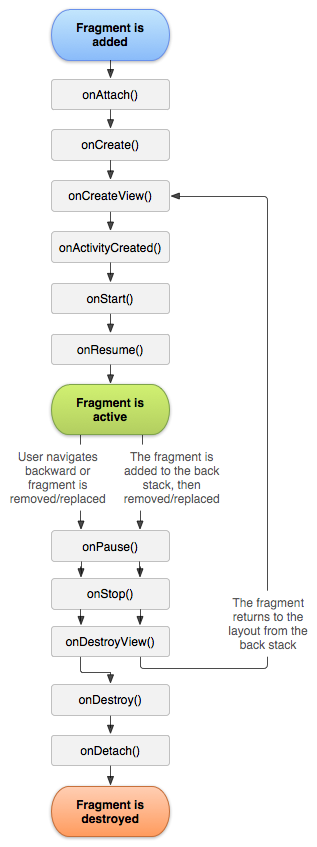
As you already know like activity, a fragment has a lifecycle with events that occur when the status changes within the framents. For example, when an event fires becasue a fragment becomes visible and active, or is not used or removed. Just as in a regular activity you are able to add code and behavior to the callbacks for the events.
Below you will see the fragment lifescycle diagram:
Understanding the lifecycle
- onAttach : the fragment attaches to its host activity
- onCreate : When a new fragment initializes, which always happens after it attaches to the hosts.
- onCreateView : creates its portion of the view hierarchy, which then added to the activity’s hierarchy of view
- onActivityCreated : fragment’s activity has finished on its own onCreate
- onStart : fragment becomes visible and starts after its activity starts
- onResume : fragment is visible and interactable that resumes only after its activity resumes and often resumes immediately after the activity does.
- onPause : user may not interact
- onStop : this is fired when the fragment is no longer visible; the fragment will get change with another fragment or it gets removed from actvity or fragment’s is stopped
- onDestroyView : this is fired when the view and other resources created within the onCreateView() are removed from the activity’s view hierarchy and destroyed.
- onDestroy : fired when the fragment does the final clean up.
- onDetach : fires when the fragment is detached from the activity host
If you want to learn more details regarding please read “Droid Fragments Life”.This is all about how the fragment come up within the activity and goes out. Cool!!
- Published in Android, Java, Kotlin, Programming Languages
Did Someone Say Reflection C#

Maybe you are new to the .Net lifestyle or maybe you are a veteran, either way, you ended up here to get a better understanding of what reflection is all about. To begin reflection is the process of describing various metadata of types, methods, and fields in code, that is literal Microsoft definition but no worries I will explain it. So before we dive into anything else you should already have an understanding of namespaces are and why we use them.
With reflection in C#, you can dynamically create an instance of a type and bing that type to an existing object. Moreover, you can get the type from an existing object and access its properties. When you use attributes in your code, reflection gives you access as it provides objects of the type that describe modules, assemblies, and types.
So in this article, I’ll discuss C# Reflection with various examples. Here we’ll learn the way of getting type information using different ways and use of properties and methods of C# Reflection type class.
Here’s a simple example of reflection using the static method GetType – inherited by all types from the Object base class – to obtain the type of a variable,
//using GetType to obtain type information
int a = 42;
System.Type type = a.GetType();
System.Console.WriteLine(type);
//the output will display as the following
//System.Int32
Defining Reflection in C#
To understand reflection, there are a few basics you should understand about modules, types, and members:
- Assemblies contain modules
- Modules contain types
- Types contain members
You need to use Reflection when you want to inspect the contents of an assembly. For example, you can get all members of the object by typing “.” before an object when viewing your Visual Studio editor IntelliSense.
A program reflects on itself when it extracts metadata from its assemblies, then uses it to modify its behavior or inform the user. When you write a C# program that uses reflection, you can use either the TypeOf operator or the GetType() method to get the object’s type.
Examples of Reflection in C#
Implementing reflection in C# requires a two-step process. You first get the “type” object, then use the type to browse members such as “methods” and “properties”. This is how you would create instances of DateTime class from the system assembly:
//create instance of class DateTime
DateTime dt = (DateTime) Activator.CreateInstance(typeof(DateTime);
Namespace Test
{
   public class YuGiOh
   {
      public YuGiOh() {...}
      public string name
      public static double Attack {get{...} set{...}}
      public static double Defense {get{...} set{...}}
      public static string Attribute() {...}
      public static string MonsterEffect() {...}
      public static int Stars () {get{...} set{...}}
      public static string CardType() {...}
   }
}

//dynamically load assembly file
Assembly yugioh = Assembly.LoadFile(@"c:'Test.dll")

//get type of class YuGiOh from just loaded assembly
Type card = yugioh.GetType("Test.YuGiOh");

//create instance of class YuGiOh
object cardInstance = Activator.CreateInstance(card);
And access its members (the following examples illustrate getting values for the public double Number property):
//get info about property: public double Attack
PropertyInfo cardPropertyInfo = card.GetProperty("Attack");

//get the value of property: public double Attack
double value = (double)cardPropertyInfo.GetValue(cardInstance, null);

//set value of property: public double Attack
cardPropertyInfo.SetValue(cardInstance, 10.0, null);
Then, you
Understanding How Reflection Works
The main class for reflection is the System.Type class, which is an abstract class representing a type in the Common Type System. When you use this class, you can find the types used in a module and namespace and also determine if a given type is a reference or value type. You can parse the corresponding metadata tables to look through these items:
- Fields
- properties
- Methods
- Events
Understanding How Reflection in C# Works
There are several uses including:
- Use Module to get all global and non-global methods defined in the module.
- Use MethodInfo to look at information such as parameters, name, return type, access modifiers, and implementation details.
- Use EventInfo to find out the event-handler data type, the name, declaring type and custom attributes.
- Use ConstructorInfo to get data on the parameters, access modifiers, and implementation details of a constructor.
- Use Assembly to load modules listed in the assembly manifest.
- Use PropertyInfo to get the declaring type, reflected type, data type, name and writable status of a property or to get and set property values.
- Use CustomAttributeData to find out information on custom attributes or to review attributes without having to create more instances.
Other uses for Reflection include constructing symbol tables, to determine which fields to persist and through serialization.
- Published in .NET & .NET Core, blog, C#, Programming Languages
Java Or Kotlin Language: Deciding Which Option to Use for Android Development
If my math is not wrong Java has been around for over 20+ years now and has no intention of going away. It holds a supreme position in the list of most popular programming languages following the C and C++ =, setting the highest usability record with millions of developers and systems.
Random Fact:
James Gosling, Mike Sheridan, and Patrick Naughton initiated the Java language back in 1991. Java has been the primary language for Android app development along with a few of its companions: Scala, Groovy and stepping up is Kotlin.
Kotlin Background
Let first you will need to understand what exactly is Kotlin so it is considered as statically typed programming language that runs on JVM(Java Virtual Machine) and JavaScript. It is developed by JetBrains and open-source community. The ‘Kotlin’ name came from Kotlin Island located near Saint Petersburg. It is supported by leading IDEs and compatible with Java 6 or Java 8. Kotlin is described as a general-purpose language and introduces functional features to support Java interoperability. The Kotlin project was born out of the aspiration for heightened productivity. The goal was to improve the coding experience in a way that was both practical and effective.
A central focus of Kotlin is to enable mixed-language projects. Kotlin also introduces improved syntax, as well as concise expressions and abstractions. Using Kotlin with Java reduces excessive boilerplate code, which is a huge win for Android developers. Kotlin came when Android development needed a more modern language to add to the qualities of java and aid in mobile development. This allows developers to not only easily update old Java apps to Kotlin, but also carry on their old work in Java to Kotlin.
Here’s a brief example Kotlin language
package hello
fun main() {
  println("Hello World")
}
It’s that simple! Kotlin uses developer-friendly coding structures and norms that are easy-to-understand and use. When considering this example from the develops’ perspective, you will be able to understand why Kotlin is loved by developers around the world. It is concise, effective, and faster compared to Java.
Is Java Dead?
Based on the group that I program with it appears that Java is currently in the area with us developers. Java is a reputable programming language with vast open-source tools and libraries to help developers. With that said, no language is without fault and even Java is subject to complications that can make a developer’s job tedious. If anything the objective for Kotlin is to supposedly introduce solutions to the common programming headaches and improve the Java ecosystem as a whole.
Strict Trial And Error
Kotlin has some milage under itself and has become a more stable and congruous development option especially within the Android Studio IDE. Some developers seem to believe that Kotlin will oust Java for Android development in future years. Other reviewers seem to believe Kotlin and Java should be coexisting without one outweighing the other.
This is a quality Java is not known for; however, readability should always take priority over concision. Yes, the succinct nature of Kotlin simplifies a developer’s job and mitigates the risk for error, but Kotlin doesn’t practice concision for concision’s sake. So let’s take the example below and compare the difference in the languages presents.
public class MathLife {
   public static double calculate () throws Exception {
      switch(op) {
         case "add":
            return a + b;
         case "subtract":
            return a - b;
         case "multiply":
            return a * b;
         case "divide":
            return a / b;
         default:
            throw new Exception();
      }
   }
}
Above is a simple calculator function written in Java. For comparison, here is the same calculator in Kotlin:
fun calculate(a: Double, op: String, b: Double): Double {
   when (op) {
      "add" -> return a + b
      "subtract" -> return a - b
      "multiply" -> return a * b
      "divide" -> return a / b
      else -> throw Exception()
   }
}
It may not seem like much, but the Kotlin version of this calculator is written in half the lines of code it took to program the function in Java. Brevity is a crucial factor in productivity. Writing large projects becomes easier when a developer is given more power for every line of code. A key observation here is Kotlin does not overlook comprehension for the sake of brevity. The syntax is concise, readable and still substantial.
The Winner: Java or Kotlin
In all fairness, chances are that you have been taught, learn and embraced Java. Switching to Kotlin at a time can be a bit of shock, so it is important to do this transition slowly to make sure you understand. having said that, Kotlin is the new official language and owing to its modern nature, it will become widely adopted in the future, so learning it and starting development with it right now would be a good idea. Understand java will continue to be a popular language for several years to come and isn’t likely to be entirely replaced. So take your time and make the switch gently.
At the end of the day, it’s all about what you feel comfortable with. As stated previously to be a true blood Androidian, you will need to have a working knowledge of the language Java. But if you already do have that then the Kotlin language of the future, so you might as well spend some time getting accustomed to it.
- Published in Android, Java, Kotlin, Language, Programming Languages
HTML5 Hidden Gems
When people tell me they are interested in web development and ask me where to begin. My response has always been to start with “HTML” it’s easy. Reflecting back on earlier introduction to web development it was really easy especially with html4 and probably hands down the easiest programming language.
HTML is an incredible and powerful markup language that can be used to give web application structure while also providing powerful accessibility benefits.
Today we will focus on 10 HTML element tags that should in your tool bag and ideally, it will aid you and ensure that your site is a more accessible and structurally sound web presence.
- Audio
- Blockquote
- Output
- Picture
- Progress
- Meter
- Template
- Time
- Video
- Word Break OP
Audio
<audio>
   <source src="bulbasaur.mp3" type="audio/mpeg" />
   <source src="bulbasaur.ogg" type="audio/ogg" />
   <source src="bulbasaur.wav" type="audio/wav" />
</audio>
Blockquote
this tag specifies a section that is considered a quote from some other source.
<blockquote>
Lorem ipsum dolor sit amet, consectetuer adipiscing elit. Aenean commodo ligula eget dolor. Aenean massa. Cum sociis natoque penatibus et magnis dis parturient montes, nascetur ridiculus mus.
</blockquote>
Output
This tag is a little fancier because it represents the results of a calculation. You can use the plus sign and equal symbol to indicate that the first and second input values should be “outputted” to the output tag; you can denote this with a for attribute containing the ids of the two elements to combine.
<form oninput="x.value=parseInt(a.value)+parseInt(b.value)">
   <input type="range" id="a" value="50">
   +<input type="number" id="b" value="25">
   =<output name="x" for="a b"></output>
</form>
Picture
This tag allows the user to specify the image sources. Instead of having an image that you scale up and down depending upon the viewport width, multiple images can be designed to fill the browser viewport. the tag is partnered with additional tags <source> and <img> tags. the following attributes are to keep in mind when using the <picture> tag.
- media: accepts any valid media query that you might define within CSS
- type: defines the MIME-type
- sizes: defines a single width value
- srcset: this is a required attribute. defines the URL of the image to display
<picture>
   <source media="(min-width:650px)" srcset="charmander.jpg">
   <source media="(min-width:465px)" srcset="evee.jpg">
   <img src="squirtle .jpg" alt="pokemon" style="width:auto;">
</picture>
The <img> tag is used to provide backward compatibility if a browser doesn’t support the <picture> tag or if none of the <source> tags to match.
Progress
This tag represents the progress of a task. the tag is not a replacement for the <meter> tag, thus components indicating disk space usage or query result relevance should use the <meter> tag.
<progress id="file" value="32" max="100"> 32% </progress>
Meter
this tag defines a scalar measurement within a defined range or a fractional value. Many also refer to this tag as a “gauge”. the tag can be used to display disk usage statistics or to indicate the relevance of search results.
<label for="disk_c">Disk usage C:</label>
<meter id="disk_c" value="2" min="0" max="10">2 out of 10</meter><br>

<label for="disk_d">Disk usage D:</label>
<meter id="disk_d" value="0.6">60%</meter>
Template
This tag contains content that is hidden from the user but will be used to instantiate the HTML code. Using javascript you can render this content with the cloneNode() method.
<template>
   <h2>Pokemon</h2>
   <img src="charmander.jpg" width="214" height="204">
</template>
Time
This tag defines a human-readable date or time. This can be used to encode dates and times in a machine-readable manner so that user agents can add reminders or scheduled events to the user’s calendar. This is also helpful for search engines to produce smarter search results.
<p>Open from <time>10:00</time> to <time>21:00</time> every weekday.</p>

<p>I have a date on <time datetime="2008-02-14 20:00">Valentines day</time>.</p>
Video
This tag specifies a video stream or movie clip. Similar to the audio tag it has formats that are supported: MP4, WebM, and Ogg
<video width="320" height="240" controls>
   <source src="mewtwo.mp4" type="video/mp4">
   <source src="mewtwo.ogg" type="video/ogg">
   Your browser does not support the video tag.
</video>
Word Break Opportunity
If you have a long block of text or a long word you can use this tag to specify where in a body to text it would be ideal to break on.
<p>To learn AJAX, you must be familiar with the XML<wbr>Http<wbr>Request Object.</p>
- Published in blog, HTML5, Programming Languages, Web Application Development
Integrating Google’s reCAPTCHA w/Android
Introduction
Google’s reCAPTCHA API protects your website/app from malicious traffic. You might have seen the reCAPTCHA integrated on web pages. You can integrate the same in your Android apps too using SafeNet API. The service is free to use and it will show a captcha to be solved if the engine suspects user interaction to be a bot instead of a human.
Within this post, I will explain and build a simple button click application that will integrate captcha to avoid bots from submitting forms on there own. But understand that this method is not only limited to form usage but a user can integrate any this module into any app
How it works
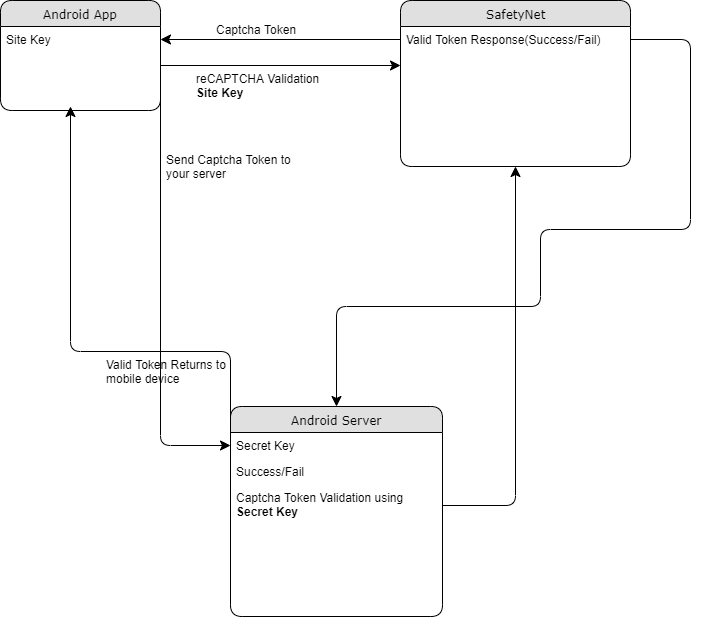
The following point will explain the simple flow of reCAPTCHA in Android with SafetyNet API.
- First, a user needs to obtain the SafetyNet key pair by registering your app. After completing this a Site & Secret Key.
- The Site Key will be integrated into an Android app and it can be public. Secret Key should be kept on your server and it shouldn’t be exposed.
- When reCAPTCHA is invoked, it will show the Captcha challenge to a user it necessary. In this step, it communicates with the captcha server and returns “User Response Token” using Site Key.
Registering your App w/SafetyNet
To begin before diving into the application creation we need to get the keys that will be validated against.
Fist go to the site following site and sign up if you do not already have an account
- https://www.google.com/recaptcha/intro/v3.html
- After accessing your account create
- Register a new account
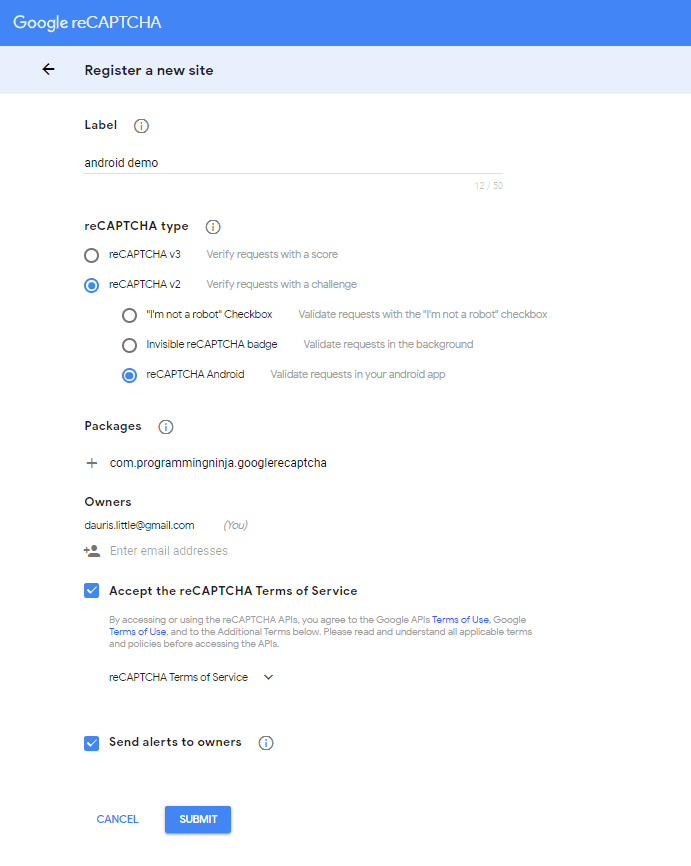
- Now enter your label, reCAPTCHA type, domains and then accept “Terms of Service”
NOTE: Regarding the label the title be anything that identifies the api key to yourself
NOTE: Regarding the selecting reCAPTCHA if working with android select reCAPTCHA v2 then reCAPTCHA Android
NOTE: Regarding populating the domain should be your Package Name in Package Names Section
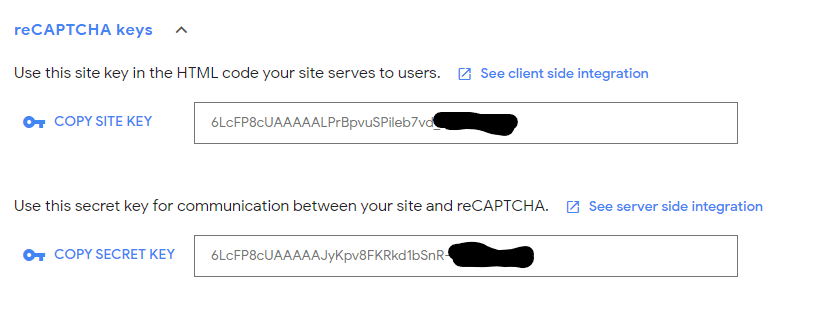
Then, you will get the site key and secret key from SafetyNet API Server and it as well as shows client and server-side integration code snippets. The following figures show the same.
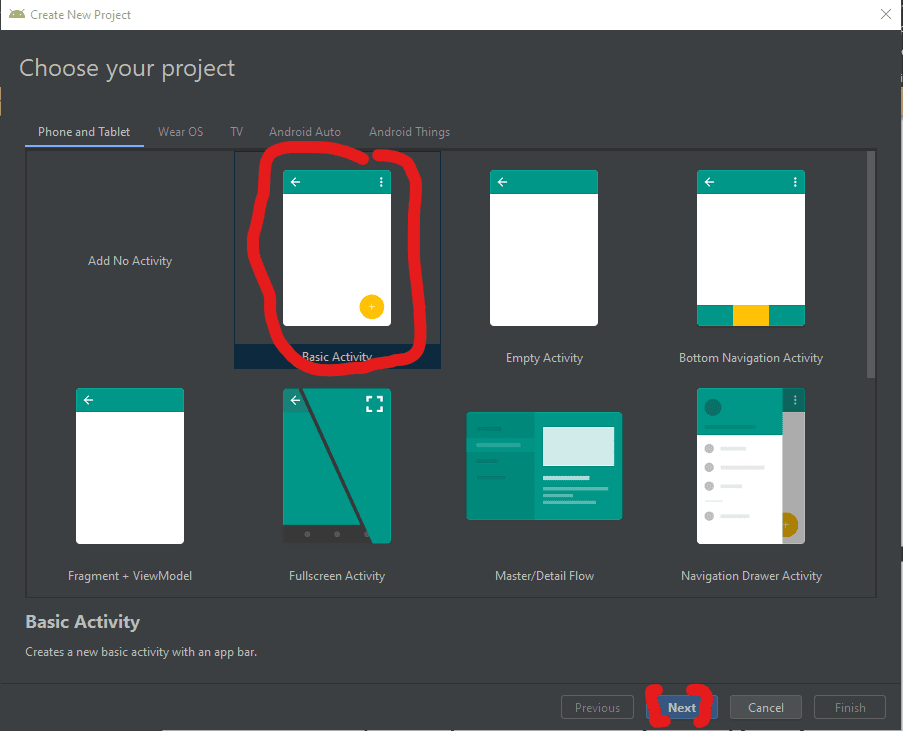
Step 1 – Create New Project w/Android Studio
Now lets begin with the fun stuff and to begin you will begin by open Android Studio and then “Create New Project”
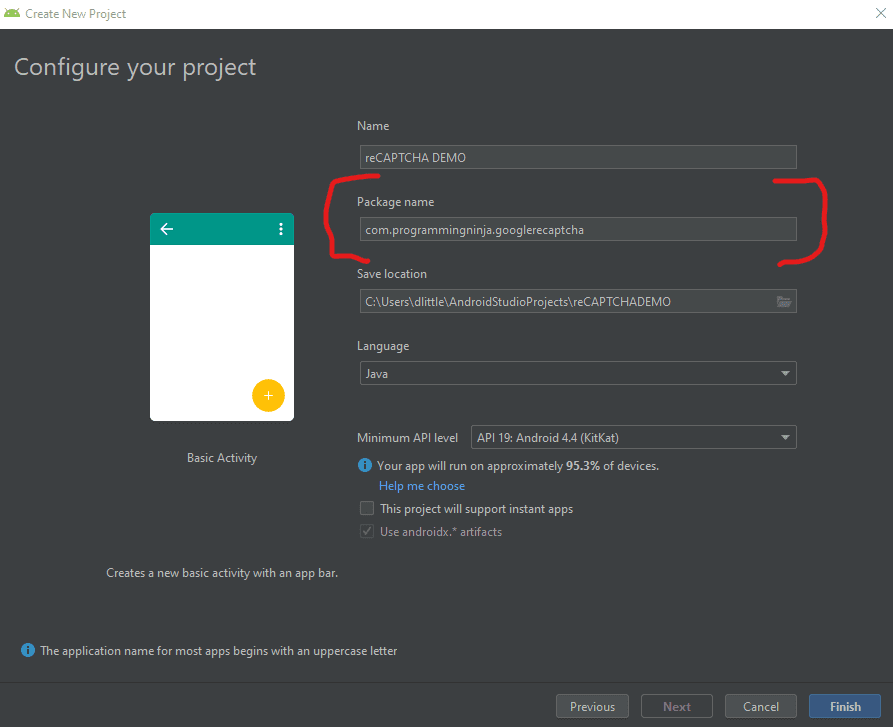
- Begin by Start a new Android Studio Project èselect Basic Activity from templates.
NOTE: While creating, use the package name you have registered on reCAPTCHA dashboard.
Step 2 – Setting up the library & AndroidMainfest for the project
Add SafeNet and the Volley dependency to your build.gradle and rebuild the project. Here, I used the following dependency. You can change as per your Android SDK.
NOTE: Volley is used to send HTTP call to our server to validate the captcha token on the server side.
build.gradle
dependencies {
    implementation fileTree(dir: 'libs', include: ['*.jar'])
    implementation 'androidx.appcompat:appcompat:1.1.0'
    implementation 'androidx.constraintlayout:constraintlayout:1.1.3'
    implementation 'com.google.android.material:material:1.0.0'
    testImplementation 'junit:junit:4.12'
    androidTestImplementation 'androidx.test.ext:junit:1.1.1'
    androidTestImplementation 'androidx.test.espresso:espresso-core:3.2.0'

    //dependency for recaptcha (safetynet)
    implementation 'com.google.android.gms:play-services-safetynet:17.0.0'

    //dependency for fast networking for networking
    implementation 'com.android.volley:volley:1.1.0'
}
Now we need to add the app manifest file with the following permission(s). SafetyNet library is used to create the captcha validation in android. Volley library is an HTTP Networkinf library used here for validating captcha response.
AndroidManifest.xml
<uses-permission android:name="android.permission.INTERNET"/>
Step 3 – Implementation of SafetyNet API
If you are still with me then let’s dive into the Java part of the project. We will first ensure that we have all the modules that will be used in the application
Required modules
import android.os.Bundle;
import android.util.Log;
import android.view.View;
import android.widget.Button;
import android.widget.TextView;

import androidx.appcompat.app.AppCompatActivity;
import androidx.annotation.NonNull;

//volley
import com.android.volley.DefaultRetryPolicy;
import com.android.volley.RequestQueue;
import com.android.volley.Request;
import com.android.volley.Response;
import com.android.volley.VolleyError;
import com.android.volley.toolbox.StringRequest;
import com.android.volley.toolbox.Volley;


import com.google.android.gms.common.api.ApiException;
import com.google.android.gms.common.api.CommonStatusCodes;
import com.google.android.gms.safetynet.SafetyNet;
import com.google.android.gms.safetynet.SafetyNetApi;
import com.google.android.gms.tasks.OnFailureListener;
import com.google.android.gms.tasks.OnSuccessListener;

import org.json.JSONObject;

import java.util.HashMap;
import java.util.Map;

import android.view.Menu;
import android.view.MenuItem;
Step 3 – Implementation of SafetyNet API (Continue)
If you are still with me then let’s dive into the Java part of the project. We will first ensure that we have all the modules that will be used in the application
- Replace “Site_Key” and “Site_Secret_Key” with your appropriate “Site Key” and “Secret Key” get from SafetyNet API while registering app.
- The API will check the Server and it has a separate callbacks from success and failure.
- At Success, we will get Captcha Response Token which will be used to validate the user interaction is made by a bot or real human.
- We will discuss how to validate the token with SafetyNet API Server in next step.
NOTE: the call on the created click event
protected void onCreate(Bundle savedInstanceState) {
        super.onCreate(savedInstanceState);
        setContentView(R.layout.activity_main);

        btn = findViewById(R.id.reCaptcha);
        txtV = findViewById(R.id.verifyText);
        btn.setOnClickListener(this);

        requestQueue = Volley.newRequestQueue(getApplicationContext());
    }

    public void onClick(View view){
        SafetyNet.getClient(this).verifyWithRecaptcha(Site_Key)
                .addOnSuccessListener(this, new OnSuccessListener <SafetyNetApi.RecaptchaTokenResponse>(){
                    @Override
                    public void onSuccess(SafetyNetApi.RecaptchaTokenResponse response){
                        if (!response.getTokenResult().isEmpty()){
                            handleCaptchaResult(response.getTokenResult());

                        }
                    }
        })
                .addOnFailureListener(this, new OnFailureListener() {
                    @Override
                    public void onFailure(@NonNull Exception e) {
                        if (e instanceof  ApiException){
                            ApiException apiException = (ApiException)e;
                            Log.d(TAG, "Error Message: " + CommonStatusCodes.getStatusCodeString(apiException.getStatusCode()));
                        } else {
                            Log.d(TAG, "Unknown error type or error" + e.getMessage());
                        }
                    }
                });
    }
Step 4 – Captcha Response Token Validation
- We have to verify the token getting from the server using the secret key.
- It can achieve by using the following.
-
- API Link – https://www.google.com/recaptcha/api/siteverify
- Method – POST
- Params – secret, response (We have to pass the “SECRET_KEY” and “TOKEN” respectively)
NOTE: Volley has
- RequestQueue to maintain the server calls in queue.
- RetryPolicy to retry the server call if it is fail with TimeOut and Retry Count. We can change those values.
- StringRequest is used for getting Response as JSON String.
- Method.POST denotes the call as POST method.
- Params are passed to server using Map, HashMap.
The SafetyNet API provides the response respective to the parameters passed and the success is Boolean Datatype.
void handleCaptchaResult(final String responseToken){
        String url = "https://www.google.com/recaptcha/api/siteverify"; //consider using global variable here
        StringRequest request = new StringRequest(Request.Method.POST, url, new Response.Listener<String>() {
            @Override
            public void onResponse(String response) {
                try {
                    JSONObject jsonObject = new JSONObject(response);
                    if (jsonObject.getBoolean("success")) {
                        txtV.setTextSize(35);
                        txtV.setText("Congratulations! You're not a robot anymore");
                    }
                } catch (Exception ex) {
                    Log.d(TAG, "Error message: " + ex.getMessage());
                }
            }
        },
                new Response.ErrorListener() {
                    @Override
                    public void onErrorResponse(VolleyError error) {
                        Log.d(TAG, "Error message: " + error.getMessage());
                    }
                })
        {
            @Override
            protected Map<String,String> getParams(){
                Map<String,String> params = new HashMap<>();
                params.put("secret", Site_Secret_Key);
                params.put("response", responseToken);
                return params;
            }
        };
        request.setRetryPolicy(new DefaultRetryPolicy(50000,DefaultRetryPolicy.DEFAULT_MAX_RETRIES,DefaultRetryPolicy.DEFAULT_BACKOFF_MULT));
        requestQueue.add(request);
    }
Full Review / Conclusion
In this blog tutorial, I was able to show you how to use Google’s reCAPTCHA in our Android app. Understand using reCAPTCHA in any app, we need to get one Site key and one Secret key and after that, we request for the captcha from the reCAPTCHA server. Once we get the reCAPTCHA and the user has entered the captcha, we send the entered value to the reCPATCA server and get the captcha token. This token is sent to our server and our server along with the secret key send the token to the reCAPTCHA server again. After that, we get some success message and that message is conveyed to our Android app.
NOTE: I have also displayed below the code for the layout for the main activity as well. This is the just a simple layout but the practical could be implemented with very little ease.
import android.os.Bundle;
import android.util.Log;
import android.view.View;
import android.widget.Button;
import android.widget.TextView;

import androidx.appcompat.app.AppCompatActivity;
import androidx.annotation.NonNull;

//volley
import com.android.volley.DefaultRetryPolicy;
import com.android.volley.RequestQueue;
import com.android.volley.Request;
import com.android.volley.Response;
import com.android.volley.VolleyError;
import com.android.volley.toolbox.StringRequest;
import com.android.volley.toolbox.Volley;


import com.google.android.gms.common.api.ApiException;
import com.google.android.gms.common.api.CommonStatusCodes;
import com.google.android.gms.safetynet.SafetyNet;
import com.google.android.gms.safetynet.SafetyNetApi;
import com.google.android.gms.tasks.OnFailureListener;
import com.google.android.gms.tasks.OnSuccessListener;

import org.json.JSONObject;

import java.util.HashMap;
import java.util.Map;

import com.google.android.material.floatingactionbutton.FloatingActionButton;
import com.google.android.material.snackbar.Snackbar;

import androidx.appcompat.widget.Toolbar;


import android.view.Menu;
import android.view.MenuItem;

public class MainActivity extends AppCompatActivity implements View.OnClickListener {

    String TAG = MainActivity.class.getSimpleName();
    Button btn;
    TextView txtV;
 // TODO - replace the SITE KEY with yours
    String Site_Key = "6LcFP8cUAAAAALPrBpvuSPileb7vd"; //consider making global variable(this will not work not a valid key)
 // TODO - replace the Secret KEY with yours
    String Site_Secret_Key = "6LcFP8cUAAAAAJyKpv8FKRkd1bSnR-"; //consider making global variable(this will not work not a valid key)
    RequestQueue requestQueue;

    //application space controls
    @Override
    protected void onCreate(Bundle savedInstanceState) {
        super.onCreate(savedInstanceState);
        setContentView(R.layout.activity_main);

        btn = findViewById(R.id.reCaptcha);
        txtV = findViewById(R.id.verifyText);
        btn.setOnClickListener(this);

        requestQueue = Volley.newRequestQueue(getApplicationContext());
    }

    @Override
    public void onClick(View view){
        SafetyNet.getClient(this).verifyWithRecaptcha(Site_Key)
                .addOnSuccessListener(this, new OnSuccessListener <SafetyNetApi.RecaptchaTokenResponse>(){
                    @Override
                    public void onSuccess(SafetyNetApi.RecaptchaTokenResponse response){
                        if (!response.getTokenResult().isEmpty()){
                            handleCaptchaResult(response.getTokenResult());

                        }
                    }
        })
                .addOnFailureListener(this, new OnFailureListener() {
                    @Override
                    public void onFailure(@NonNull Exception e) {
                        if (e instanceof  ApiException){
                            ApiException apiException = (ApiException)e;
                            Log.d(TAG, "Error Message: " + CommonStatusCodes.getStatusCodeString(apiException.getStatusCode()));
                        } else {
                            Log.d(TAG, "Unknown error type or error" + e.getMessage());
                        }
                    }
                });
    }

    void handleCaptchaResult(final String responseToken){
        String url = "https://www.google.com/recaptcha/api/siteverify"; //consider using global variable here
        StringRequest request = new StringRequest(Request.Method.POST, url, new Response.Listener<String>() {
            @Override
            public void onResponse(String response) {
                try {
                    JSONObject jsonObject = new JSONObject(response);
                    if (jsonObject.getBoolean("success")) {
                        txtV.setTextSize(35);
                        txtV.setText("Congratulations! You're not a robot anymore");
                    }
                } catch (Exception ex) {
                    Log.d(TAG, "Error message: " + ex.getMessage());
                }
            }
        },
                new Response.ErrorListener() {
                    @Override
                    public void onErrorResponse(VolleyError error) {
                        Log.d(TAG, "Error message: " + error.getMessage());
                    }
                })
        {
            @Override
            protected Map<String,String> getParams(){
                Map<String,String> params = new HashMap<>();
                params.put("secret", Site_Secret_Key);
                params.put("response", responseToken);
                return params;
            }
        };
        request.setRetryPolicy(new DefaultRetryPolicy(50000,DefaultRetryPolicy.DEFAULT_MAX_RETRIES,DefaultRetryPolicy.DEFAULT_BACKOFF_MULT));
        requestQueue.add(request);
    }
}
<androidx.constraintlayout.widget.ConstraintLayout
    xmlns:android="http://schemas.android.com/apk/res/android"
    xmlns:app="http://schemas.android.com/apk/res-auto"
    xmlns:tools="http://schemas.android.com/tools"
    android:layout_width="match_parent"
    android:layout_height="match_parent"
    tools:context=".MainActivity">
    <LinearLayout
        android:layout_height="match_parent"
        android:layout_width="match_parent"
        android:orientation="vertical">

        <Button
            android:id="@+id/reCaptcha"
            android:layout_height="wrap_content"
            android:layout_width="wrap_content"
            android:text="Show reCAPTCHA"/>

        <TextView
            android:id="@+id/verifyText"
            android:layout_width="wrap_content"
            android:layout_height="wrap_content"
            android:capitalize="characters"
            android:text="Hello World"
            android:textSize="24sp" />

    </LinearLayout>
</androidx.constraintlayout.widget.ConstraintLayout>
- Published in Android, API, blog, Java, Mobile Development, Programming Languages
The ($) and (_) within JavaScript

The dollar sign ($) and the underscore (_) characters are JavaScript (js) identifiers, which just means that they identify an object in the same way a name would. The objects they identify include things such as variables, functions, properties, events, and objects.
For this reason, these characters are not treated the same way as other special symbols. Instead, JavaScript treats $ and _ as if they were letters of the alphabet.
A js identifier — again, just a name for any object — must start with a lower or upper case letter, underscore (_), or dollar sign ($); subsequent characters can also include digits (0-9). Anywhere that an alphabetic character is allowed in js, 54 possible letters are available: any lowercase letter (a through z), any uppercase letter (A through Z), $ and _.
What is the ($) Identifier
The dollar sign is commonly used as a shortcut to the function document.getElementById(). Because this function is fairly verbose and used frequently in js, the $ has long been used as its alias, and many of the libraries available for use with JavaScript create a $() function that references an element from the DOM if you pass it the id of that element.
There is nothing about $ that requires it to be used this way, however. But it has been the convention, although there is nothing in the language to enforce it.
The dollar sign $ was chosen for the function name by the first of these libraries because it is a short one-character word, and $ was least likely to be used by itself as a function name and therefore the least likely to clash with other code in the page.
Now multiple libraries are providing their own version of the $() function, so many now provide the option to turn off that definition in order to avoid clashes.
Of course, you don’t need to use a library to be able to use $(). All you need to substitute $() for document.getElementById() is to add a definition of the $() function to your code as follows:
function $(x) {return document.getElementById(x);}
What about (_) Identifier
A convention has also developed regarding the use of _, which is frequently used to preface the name of an object’s property or method that is private. This is a quick and easy way to immediately identify a private class member, and it is so widely used, that almost every programmer will recognize it.
This is particularly useful in JavaScript since defining fields as private or public is done without the use of the private and public keywords (at least this is true in the versions of JavaScript used in web browsers — js 2.0 does allow these keywords).
Note that again, as with $, the use of _ is merely a convention and is not enforced by JavaScript itself. As far as js is concerned, $ and _ are just ordinary letters of the alphabet.
Of course, this special treatment of $ and _ applies only within JavaScript itself. When you test for alphabetic characters in the data, they are treated as special characters no different from any of the other special characters.
- Published in blog, Javascript
The Wonders of Getters & Setters in JS

Okay with the assumption that you are a ” something that reference newbie” and be aware I am probably two years in the game and just now understanding this behind javascript.
So as you may already know ‘Getters’ and ‘Setters’ are common archetypal methods in several other programming languages, specifically more within object-oriented languages like C#, Java, and Objective- C. Solet go ahead and dig right into it.
In most object-oriented languages, ‘Getters’ and ‘Setters’ refer to the properties of a given object. Getters are methods that return the value of that property, and as you may assume setters set them. Now Javascript has many object-oriented features, and this taps into some of those.
The reason they’re a thing and why they exist is a lot more clear in other languages in my personal opinion. So I will go on a tangent briefly so you can understand what I mean and the language of my choice will be Java. Okay, so let’s assume that you want to make some cars. To do that, in java we need a class called “Cars”
class Car {
   private int year;
   private string make;
   private string model;
   private string vin;
   private string color;
}
To make a car, we’d do this
//create a new car that will be called infiniti
Car infiniti = new Car();
A result, since Infiniti is a car and we said that Cars have a year and a make, we know Infiniti has these.
Don’t worry I will each the code snippet stated above, take note of the word private? That means that only Infiniti knows its year and its make and most importantly, it’s own vin. What this means is that Java, the following would not run and would fail:
CarJacker someRandomThief = new CarJacker();
someRandomThief.attemptingToGetVin(infiniti.vin);
In JS, you can do that –access the property directly through the dot operator. Now, why on the earth would you want that in a language? Because it makes things easier to maintain, it makes code safer and of course cleaner in the long run. When those properties are private, you can prevent other parts of a program you’re writing from accidentally changing them and weird bugs from showing up. this protecting of properties from outside objects is called encapsulation and is hugely important in OOP. Some would consider this a great feature but it can also be super annoying, because how often do we have variables that we never want any other part of the program to access?
Finally entering into the fray are ‘Getters’ and ‘Setters’. Commonly in Java and other languages as stated before getters and setters methods which allow “outsiders” to access those properties.
class Car {
   private int year;
   private string make;
   private string model;
   private string vin;
   private string color;

   public string getVinNumber() {
      //this method returns the vin number of the car
      return vin;
   }

   public void setVinNumber(string newVinCreated) {
       //'this' refers to the object itself --Infiniti, etc
       this.vin = newVinCreated;
   }
}
As a result, outside objects can now interact! So if our car thief got lucky, it could instead:
CarJacker someRandomThief = new CarJacker();
//now we just stole a new car
someRandomThief.attemptingToGetVin(infiniti.getVinNumber());
Now in Java, and the other languages that I know of, ‘getter’ and ‘setter’ are common but not formal: ie, I could call getVinNumber() something as unrelated as UnlessMethodName() and it would still work–but would just be a note helpful name.
I know this was much longer than some of my other posts but it all has a purpose of course. Now within the js you have “get” and “set” doing those things because of the OOP idea of encapsulation and getters and setters, which is a useful idea–and sort of a hard sell in particular in js, where it’s not enforced because you don’t have to declare whether something is private, so it becomes a sort of arbitrary weird layer unless you understand the original intended purpose.
Ultimately the pattern behind is a thing I dislike about JavaScript — and I’ll be as honest as I can be, I’ve read that documentation so many times before, and even again as I was preparing this post and without much it still makes very little sense to me, and I’ve had a lot more experience since the first time I read it along with a hunk of object-oriented under my belt… and it still is really hard to follow.
In short, get latest() is a means of having things happen when you want the value of latest, and enables that to happen–since you have to have a function or method for things to happen–while still letting you skip the “()” because it’s single value representing a property.
- JS has a prototypical inheritance, not class-based. Which is far from the only difference, but a huge one.
- As with everything, there are differences of opinion and you can still have crazy OOP code, it’s not perfect but that’s the intended purpose.
- I strongly feel that stuff like Raccoon raccoon = new Raccoon() leads too quickly to semantic satiation and can lead to more bugs and always go for more specific or least different variable names when I can, but anyways.
- Published in blog, Javascript, Like I Am Five
UMD & ESM… What the heck is this?

In the beginning, JS did not have a way to import/export modules. This was a problem for many developers and if you don’t believe then picture this. You’re writing an app in just a single file, I know I know it would be a nightmare.
So as time progress, people of higher intellect than myself attempted to add modularity to javascript. The ones that shouldn’t surprise you is UMD and ESM but there are others of course like CommonJS, Native JS and AMD. There are several others but the two from above are considered some of the big players
I am going to tackle some brief information like syntax, purpose and common behaviors. My goal is to help others that may be confused when dealing with particular issues with modules.
UMD
Universal Module Definition or as referenced UMD.
– Works on front and back end (hence the name universal).
– Unlike the other modules, UMD is more like a pattern to configure several module systems. Check out other patterns
– UMD is usually used as a fallback module when using bundler like rollup/Webpack
(function (root, factory) {
if (typeof define === "function" && define.amd) {
define(["jquery", "underscore"], factory);
} else if (typeof exports == "object") {
module.exports = factory(require("jquery"), require("underscore"));
} else {
root.Requester = factory(root.$, root._);}}(this, function ($,_) {	//this is where I defined my module implementation	var Requester = {//...};
return Requester;}));
ESM
ES Module short as ESM. It is javascript’s proposal to implement as standard module system. I am sure many of you have seen this: import React from 'react'
- Works in many modern browsers
- Tree-shakeable, due to ES6’s static module structure
- ESM allows bundlers like rollup to remove unnecessary code, allowing sites to ship less code to get faster load
- can be called in HTML
<script type="module"> import {func1} from 'my-lib';
func1(); </script>
Summary
– ESM is the best module format thanks to its simple syntax, async nature, and tree-shakeability.
– UMD works everywhere and usually used as a fallback in case ESM does not work
Thanks for reading, devs! In the future, I plan to write in depth about each module, especially ESM because it is packed with many awesomeness.
- Published in blog, Javascript